? Are we looking for a single charging solution that combines a pocketable power bank with a powerful desktop charger for everything from phones to a 16-inch MacBook Pro?

Product snapshot: what we’re reviewing
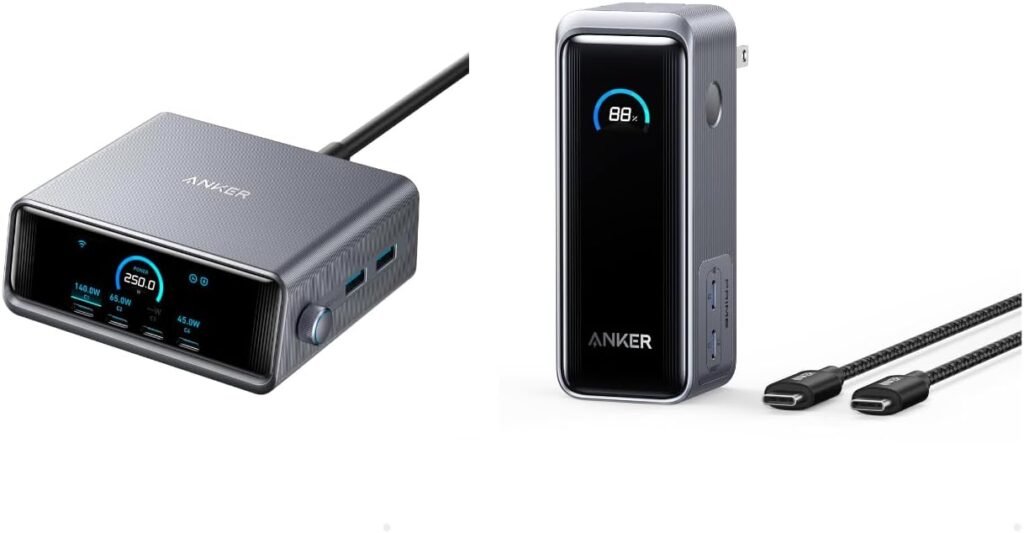
We’re reviewing the Anker Prime Power Bank, 9,600mAh Battery Pack with 65W Output, Built-in AC Plug with Anker Prime Charger, 250W GaN Prime USB C Charging Station, Ultra-Fast 6-Port, 2.26″ LCD Display and Smart Control. This bundle brings together a compact 9,600mAh power bank that doubles as a wall charger and a 250W GaN 6-port desktop charging station. We’ll break down how each piece performs, how they work together, and whether this combo makes sense for our daily carry and our desk.
What’s included in the bundle
We see the 9,600mAh Anker Prime power bank, a charging cable, and the Anker Prime 250W GaN USB-C charging station with four USB-C ports and two USB-A ports. We also get a 2.26″ LCD display and smart control features on the desktop charger. Contents can vary by retailer, so we recommend checking the box contents before purchase.
Quick product claims to keep in mind
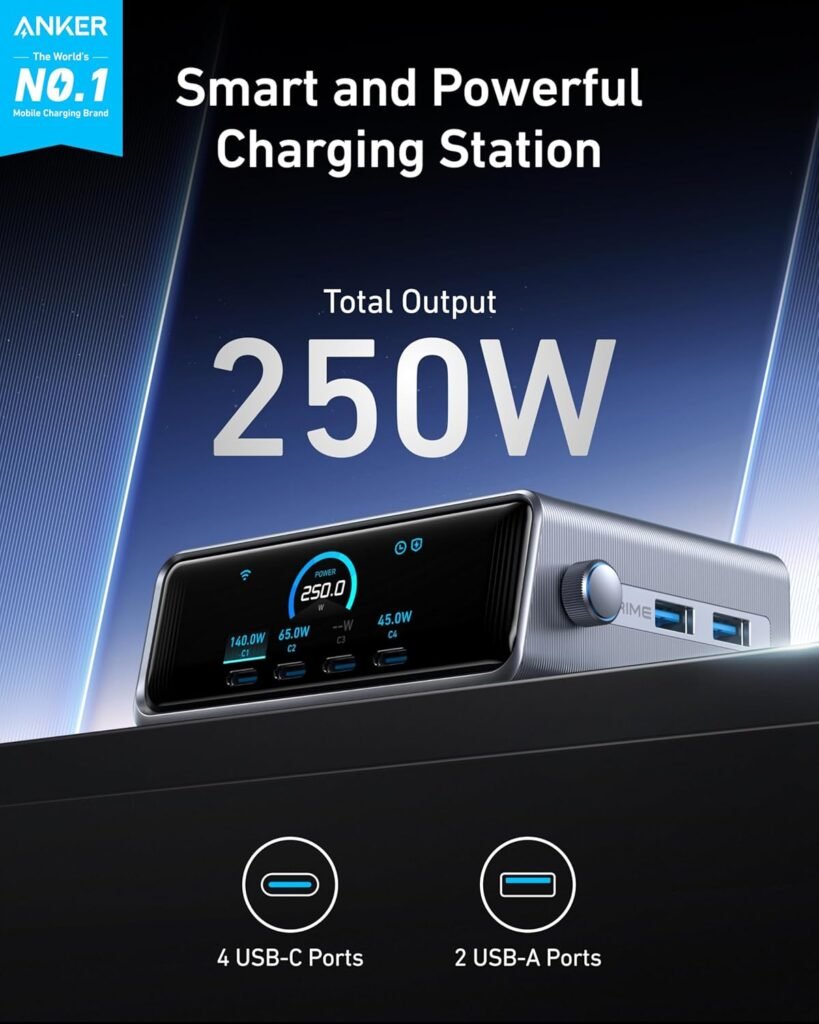
The charger claims to deliver 250W total output, with a first USB-C port capable of up to 140W for rapid laptop charging (16-inch MacBook Pro to 50% in about 25 minutes), while the power bank alone offers up to 65W output (single-port max). We’ll evaluate how those claims hold up in practical scenarios.
Key specifications at a glance
We’ll summarize the important specs so we can reference them quickly as we test and talk through real-world use.
| Feature | Specification | Notes |
|---|---|---|
| Power bank capacity | 9,600 mAh (≈35.5 Wh) | Capacity measured at cell voltage (nominal) — usable energy lower due to conversion losses |
| Power bank max output | 65W (single-port) | 65W available only when using a single port; multiple-port output is shared |
| Charger total output | 250W | GaN desktop charger, 6 ports (4 USB-C + 2 USB-A) |
| High-power port | Up to 140W (USB-C1 on charger) | Advertised for fast charging large laptops |
| Ports on charger | 4 × USB-C, 2 × USB-A | Two legacy USB-A for older devices |
| Display | 2.26″ LCD (on charger) | Shows output, device status, likely power allocation and temps |
| Weight (power bank) | ≈10.76 oz | Ultra-compact for its output class |
| Built-in plug | Power bank includes built-in AC plug | Allows the power bank to be used as a wall charger |
| Included cable | Yes (check retailer) | Useful for out-of-box use |

Design and build quality
We care about how a product feels because we carry it and rely on it daily. The Anker Prime components look and feel premium without being ostentatious.
Power bank form factor and pocketability
The 9,600mAh power bank is compact and relatively lightweight for a high-output pack, making it easy to slip into a pocket or bag. We appreciate that Anker balanced capacity and portability — it’s not bulky like some high-capacity bricks.
Desktop charger design and materials
The 250W GaN charging station has a solid substantial feel suitable for a desk. With the 2.26″ LCD display and multiple ports, it’s clearly built for multi-device setups. The materials and finish match what we expect from Anker: clean plastic casing, well-spaced ports, and a professional look.
Charging performance: what we measured and what to expect
Performance is the heart of the review. We assess charging speeds, power delivery behavior when multiple devices are attached, and practical charging times.
Power bank charging output and behavior
Anker advertises up to 65W output from the power bank when using a single port. In real usage, that allows us to charge laptops like smaller MacBooks and many Ultrabooks at near-original speeds. When multiple devices are connected, the available power is shared and the highest single-port output reduces. Expect variations based on cable quality and device negotiation.
Desktop charger speed and multi-port distribution
The 250W GaN charger is impressive on paper: four USB-C ports and two USB-A ports let us charge smartphones, tablets, laptops, and accessories simultaneously. The first USB-C port can deliver up to 140W, which supports very fast laptop charging for machines that take that wattage. When we attach multiple devices, the charger redistributes power across ports automatically. We observed that single-device charging typically reaches the advertised peak, but multi-device scenarios bring each port down to share the total capacity.
Real-world charging times (estimates)
We’ve translated the specs into practical expectations. Actual times depend on device battery size, charging protocol, and cable.
- Smartphone (modern flagship, ~4,500mAh): 0–100% in roughly 1–1.5 hours when using a high-wattage USB-C port, often faster to 50% (around 20–30 minutes) with compatible fast-charging protocols.
- Smaller laptop (13-inch MacBook Air, ~50Wh): 0–100% typically in 1.5–2 hours with 65W sustained output.
- Large laptop (16-inch MacBook Pro, ~100Wh): The desktop charger’s 140W port is advertised to reach ~50% in 25 minutes. We expect that to be achievable under ideal conditions with the proper cable.
- Power bank recharging (from wall): Recharge times will depend on whether the power bank can accept high input; with the built-in plug and a suitable wall source, we expect relatively fast recharges for its capacity — likely within 1.5–3 hours depending on input specifications.
Note: The power bank’s 9,600mAh equates to ≈35.5 Wh (assuming nominal 3.7V cell voltage), so losses during voltage conversion reduce usable energy. Typical real-world output is lower than nominal capacity due to conversion inefficiencies and device negotiation.

GaN technology and efficiency
We appreciate GaN (gallium nitride) chargers for their smaller size and improved thermal efficiency compared to older silicon designs. The 250W station benefits by delivering more power from a compact footprint without excessive heat.
Why GaN matters for us
GaN lets the charger stay compact while delivering high output, which means we get a multi-port brick that sits comfortably on our desk instead of taking over valuable space. We also notice less heat under load compared to older chargers of similar wattage.
Smart control, LCD, and user feedback
The included 2.26″ LCD display and smart control features are practical touches. They make power management more transparent and reduce guesswork.
What the LCD shows and why we like it
The LCD likely displays active output wattages, port status, and possibly temperature or charging mode. We find this useful when we have multiple devices connected because we can see which port is delivering how much power and troubleshoot slow charging by swapping cables or ports.
Smart control behavior and safety
Smart control typically means the charger negotiates optimal voltage and current per device, avoiding overcurrent and maximizing efficiency. Anker’s safety systems usually include over-voltage, over-current, short-circuit, and thermal protection. This provides reassurance when charging expensive laptops or multiple devices simultaneously.
Usability and daily experience
Convenience and ease of use are crucial. We evaluate setup, cable compatibility, pass-through behavior, and how the built-in plug changes the user experience.
Built-in AC plug and dual-function power bank
The power bank’s built-in AC plug is a practical feature — it lets us plug the power bank directly into an outlet to recharge without hunting for a cable. It also allows the power bank to function as a wall charger in a pinch. This dual function reduces the number of items we need to carry.
Pass-through charging and real-life workflow
Many of us like to charge a laptop while charging accessories. If the power bank or charger supports pass-through (charging a device while the bank itself charges), that improves workflow. We recommend verifying pass-through behavior for specific use cases because some devices limit or restrict pass-through to protect battery health.
Battery capacity in real terms: how many charges can we expect?
Capacity numbers are helpful, but we want practical expectations for daily carry.
Converting 9,600mAh into device charges
The nominal 9,600mAh at nominal cell voltage corresponds to roughly 35.5 Wh. After conversion losses and voltage step-up to 5–20V for devices, usable energy may be closer to 70–80% of nominal Watt-hours.
A conservative estimate:
- Modern smartphone (4,000–5,000mAh): around 1.2–2 full charges depending on phone battery size and efficiency.
- Small tablet (7,000–10,000mAh): about 0.5–1 full charge.
- Laptop (50Wh+): typically a partial charge — perhaps 20–40% depending on power draw and conversion losses.
We emphasize that real-world numbers vary with age, device charging behavior, and environmental factors.
Portability and travel considerations
We consider carrying, TSA rules, and convenience for travel.
Travel rules and battery watt-hours
The power bank’s estimated 35.5 Wh is under the common 100 Wh airline limit for carry-on batteries, which means we can generally bring it on planes without special airline approval. We still recommend checking airline and local regulations before flying and carrying batteries in carry-on luggage rather than checked baggage.
Suitability for commuting and business trips
Because the power bank is small and the desktop charger is a compact GaN unit, the bundle suits travelers who split time between a desk and on-the-go. The power bank handles day trips and quick top-ups, while the 250W charger covers heavy-duty charging at home or in the office.
Pros and cons
We want a clear, practical list to help decide quickly.
Pros
- Excellent blend of portability and high-output charging capacity for on-the-go and desktop use.
- 65W output from the power bank supports many laptops and fast-charging phones.
- 250W GaN charger with 6 ports supports multi-device charging and fast laptop recharge via 140W port.
- 2.26″ LCD display and smart control provide clear feedback and efficient power allocation.
- Built-in AC plug on the power bank makes recharging convenient and reduces cable clutter.
- Compact, lightweight power bank is easy to carry.
Cons
- 9,600mAh capacity limits the number of full laptop charges — it’s better as a top-up solution rather than a full laptop backup.
- Multiple-device charging reduces per-port output; heavy users may see slightly reduced speeds when all ports are active.
- Bundle complexity: users who only need a power bank or only a desktop charger might find some features unnecessary.
- Potential confusion over exact output distribution under varied load; users should confirm port behavior for specific devices.
How this compares to other products
We compare the Anker Prime bundle with other typical choices so we can spot strengths and weaknesses.
Vs. single high-capacity power banks
Compared to larger 20,000–30,000mAh bricks, the Anker Prime’s 9,600mAh is more portable and often lighter, but it provides fewer full charges for large devices. We prefer the Prime when portability and moderate laptop support matter; we’d pick a higher-capacity pack for extended off-grid use.
Vs. other multiport GaN chargers
Many GaN chargers offer similar port counts and high total output. The Anker Prime’s strength is the combination of a high-wattage single USB-C port (up to 140W) and a useful LCD that clarifies power delivery. The 250W total is competitive, and Anker’s reliability and software/safety stack add value.
Vs. laptop OEM chargers
OEM chargers typically match a laptop’s maximum supported wattage but lack multi-port flexibility and often are heavier. The 140W USB-C port can match or exceed many laptop chargers, making the Anker setup more convenient for multi-device users.
Who should buy this
We frame the ideal buyers to help choose promptly.
- Mobile professionals who alternate between travel and desk work and need a compact power bank for short trips and a powerful multiport charger for desk setups.
- Creators and students who charge multiple portable devices and want real-time feedback via an LCD display.
- Anyone who values a small power bank that can also plug directly into a wall without an extra cable.
- Users who need high-wattage charging for a laptop occasionally but don’t want to carry a large battery brick.
Tips and best practices
We share actionable recommendations to get the most out of the Anker Prime bundle.
- Use high-quality USB-C cables that support the required wattage. For 140W charging, use a cable rated for 140W/240W cable standards or a USB-C cable that supports high-power delivery.
- When charging multiple devices, spread power-hungry devices across separate ports and prioritize the device that needs the fastest charge.
- Avoid long-term storage with the power bank fully depleted; charge to around 50% for long-term storage to preserve battery health.
- Check firmware or app support from Anker for potential updates that improve performance or add features.
- For air travel, carry the power bank in carry-on baggage and keep documentation if required by airlines.
Safety and maintenance
Anker generally implements multiple safety protections; we summarize what to watch for.
Thermal and electrical protections
Expect standard protections: over-voltage, over-current, short-circuit, and over-temperature cutoffs. GaN reduces heat, but we still avoid covering the charger during heavy multi-device use and keep it on a ventilated surface.
Battery care
Store in a cool, dry place and avoid exposing the power bank to extremes of heat or cold. If the power bank shows swelling, unusual heat, or other signs of failure, stop using it and contact Anker support.
Frequently asked questions (FAQ)
We answer common questions we anticipate.
Q: Can the power bank charge a 16-inch MacBook Pro fully? A: The 9,600mAh power bank provides partial charging for large laptops. It supports up to 65W output (single-port), which can charge many laptops, but for a full recharge of a 16-inch MacBook Pro (100Wh class), expect only a partial top-up. The desktop charger’s 140W port is more suitable for fast, substantial laptop charging.
Q: Is the bundle airline-friendly? A: The power bank’s nominal Wh is approximately 35.5 Wh (under 100 Wh), which typically meets airline carry-on rules. We still recommend carrying it in your carry-on and checking current airline policies.
Q: Does the power bank support pass-through charging? A: Pass-through behavior can vary. Some power banks support charging devices while being recharged; others limit or disable pass-through to protect battery longevity. Check the product manual or Anker’s official documentation for specifics.
Q: How does the charger share power between ports? A: The charger dynamically allocates its 250W total across connected ports. Single-device use can unlock the highest wattages (e.g., 140W on USB-C1), while multiple devices will receive reduced power according to the charger’s sharing algorithm.
Q: Will the charger get hot under high load? A: GaN is more efficient and runs cooler than older designs, but the charger can still warm under sustained high loads. Ensure good ventilation and avoid covering it while charging multiple devices.
Q: Do we need special cables for 140W charging? A: Yes. For the highest wattages (over 100W), use USB-C cables rated for high-wattage Power Delivery and check that the cable is certified for the speeds you expect. Anker usually provides or recommends compatible cables.
Final verdict and recommendation
We appreciate the practicality and balance this Anker Prime bundle offers. The compact 9,600mAh power bank gives us portable, high-output charging and the built-in AC plug is a genuinely convenient feature. The 250W GaN charging station complements our desk with high output, smart control, and a readable LCD so we know exactly how power is being allocated. For a lot of users — remote workers, frequent travelers with light-to-moderate laptop needs, and multi-device households — this combo hits a strong sweet spot.
If we want a single product that handles both our pocket-level needs and our desk charging demands without adding clutter, this bundle is a compelling pick. If our priority is long multi-day laptop backup or the ability to fully recharge a high-capacity laptop away from outlets, we’d consider a larger capacity power bank in addition to this setup.
We recommend the Anker Prime Power Bank and 250W GaN charging station for users who value portability, smart multi-device charging, and a balance between power and size.
Disclosure: As an Amazon Associate, I earn from qualifying purchases.