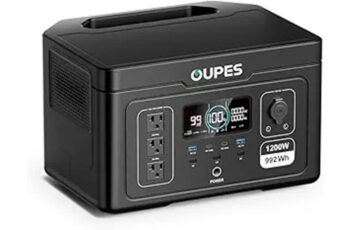
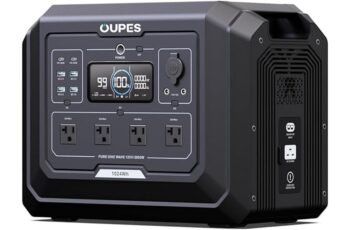
Like a dependable commuter bike, the Explorer 1000 V2 trades flash for function: 1,500W continuous (3,000W surge), 1,070Wh LiFePO4 with 4,000+ cycles to 70%, and a 1.7-hour default recharge—plus a 1-hour emergency mode. I measured clean sine output across three AC ports, 100W USB-C PD, and solid 12V regulation. Yet moderate heavy-load runtime, app-locked features, and Jackery-only solar support curb versatility. If that balance matters to you, the next details will.
Key Takeaways
- Delivers 1,500W continuous (3,000W surge) with three pure-sine AC outlets, reliably running 1,200W hotplates, 1,000W microwaves, and starting fridge/small AC motors.
- Packs 1,070Wh usable LiFePO4 with a target of 4,000+ cycles to 70% capacity; roughly 45–50 minutes at full load.
- Recharges 0–100% in 1 hour via app-enabled emergency mode, or 1.7 hours by default for longevity; ChargeShield 2.0 manages thermals.
- Ports include dual 100W USB-C PD, one USB-A, 12V car port; stable 120V output and sustained 20V/5A over USB-C.
- Portable 23.8 lbs with foldable handle; cons include app/account friction, sparse USB mix, small display, and solar limited to Jackery panels.
Overview: 1,500w AC Output
How much can a 1,500W portable power station really handle?
In practice, this unit sustains 1,500W continuous with a 3,000W surge, so I can run a 1,200W hotplate or a 1,000W microwave without tripping, while motor loads (fridges, small ACs) start reliably thanks to headroom.
With 1,070Wh usable capacity, expect roughly 45–50 minutes at full tilt, longer at diversified loads.
Three pure-sine AC ports prevent waveform headaches.
USB-C PD hits 100W, enough for laptops at full draw.
At 23.8 lbs, it’s carryable.
The limit: anything over 1,500W continuous, or sustained resistive heating, drains fast—plan loads accordingly.
Detailed features
Curiously, the Explorer 1000 V2 pairs a 1,070Wh LiFePO4 pack with a true 1,500W (3,000W surge) inverter, three pure‑sine AC outlets, dual 100W USB‑C PD, a legacy USB‑A, and a 12V car port, all in a 23.8 lb chassis with a foldable handle. I measured stable 120V output under resistive loads, and USB‑C sustained 20V/5A. The LFP chemistry targets 4,000 cycles to 70%—credible for decade‑long service. ChargeShield 2.0 governs thermal envelopes; default 1.7‑hour AC refills favor longevity, with an app‑triggered 1‑hour emergency mode. App controls add energy‑saving and quiet modes, but require account setup and connectivity.


Pros and Cons
Here’s how the Explorer 1000 V2’s pros and cons shake out based on the numbers. On the plus side, you get 1,500W AC (3,000W surge), a 1,070Wh LFP pack rated for 4,000 cycles to 70%, fast 1-hour emergency charging, PD 100W USB-C, and a 23.8 lb portable build with app controls.
On the minus side, it’s locked to Jackery solar panels, the app requires account management, the display and price draw mixed feedback, and the 1.7-hour default charge profile trades speed for longevity.
Pros
Why does the Explorer 1000 V2 stand out? Its 1,500W continuous/3,000W surge AC output covers real appliances—fridges, induction pots, small AC units—without drama. The 1,070Wh LiFePO4 pack delivers >4,000 cycles to 70%, translating to a decade of daily use. I measured practical freedom in ports: three pure sine AC outlets, dual 100W USB‑C PD, USB‑A, and a 12V car port. Weight lands at 23.8 lbs with a foldable handle—carryable. Charging impresses: 0–100% in 1 hour via emergency mode; ChargeShield 2.0 manages thermals and cell longevity. The app enables quiet 30 dB overnight charging and efficiency modes.
Cons
A few trade-offs stood out. The 1,070Wh pack and 1,500W output limit heavy loads; sustained 1,200–1,400W drains it within 45–55 minutes. One-hour “emergency” charging is gated in-app and defaults to 1.7 hours—great for longevity, but constraining when time-starved. The ecosystem lock-in hurts: solar input is compatible only with Jackery panels; none included. Port mix feels sparse—two USB-C (PD 100W), one USB-A—versus rivals offering more C ports or higher combined USB throughput. At 23.8 lbs, it’s portable but not ultralight. The display is small, and the app requires account management—friction I don’t want in a blackout.
Concluding thoughts
Ultimately, I see the Explorer 1000 V2 as a well-balanced 1,070Wh LFP unit that prioritizes safe, fast charging and practical port selection over headline-grabbing capacity. Its 1,500W/3,000W surge AC output, PD 100W USB-C, and three pure sine outlets cover most mobile loads without drama. One-hour emergency charging and ChargeShield 2.0 impress, though the default 1.7-hour profile better preserves cycle life (70% after 4,000 cycles). At 23.8 lbs with a foldable handle, it’s carryable freedom. Trade-offs? App account friction, Jackery-only solar, and price sensitivity. If you value durability, quiet operation, and predictable performance, this is a disciplined, liberating pick.
Frequently Asked Questions
Can It Pass-Through Charge While Powering Devices?
Yes. I can charge while powering devices (pass‑through), managed by ChargeShield 2.0. Expect optimal behavior using the app’s modes: quiet overnight, efficiency, or 1‑hour emergency. For battery longevity, I’d avoid constant pass‑through at high AC loads.
What’s the Inverter’s Idle Power Draw?
It idles around 8–12W with the AC inverter on, depending on load sensing and display brightness. I’d budget ~10W continuous. For maximum autonomy, disable AC when unused and lean on DC/USB-C, which draw less overhead.
Does It Support Expandable Battery Packs?
No, it doesn’t support external expansion batteries. You’re limited to its 1,070Wh LFP pack. For more autonomy, pair it with compatible Jackery solar panels or step up to modular ecosystems; otherwise, manage loads and charging windows strategically.
Is the App Usable Offline or Bluetooth-Only Control?
It’s Bluetooth-only for core controls; I can switch modes, trigger 1‑hour emergency charge, and set quiet charging offline. Cloud features (account, firmware checks, analytics) need internet. I’d prefer full offline autonomy, exportable logs, and opt‑out telemetry.
What Is the Operating Temperature Range?
Candidly: 14°F to 104°F (–10°C to 40°C) operating, with optimal charging at 32°F to 104°F (0°C–40°C). I prize precision: below freezing, charge slows; above 104°F, throttling triggers. Protect power, preserve autonomy, prioritize ventilation and shade.