?Thinking about whether the Anker 563 USB-C Hub (10-in-1, Dual 4K HDMI), Docking Station Dual Monitor, with Max 100W Pd-in, 5Gbps USB Data Ports for Windows Laptops, Dell XPS, Thinkpad, MacBook Pro, MacBook Air and More fits our setup and workflow?

Quick overview
We find the Anker 563 to be a compact, full-featured USB-C hub that aims to replace a handful of adapters and simplify a multi-monitor, multi-peripheral workstation. It packs 10 ports into a single unit and is built to handle charging, display output, wired networking, storage card access, and high-speed data transfer simultaneously.
What’s included in the box
We like to know what arrives with a product so we can start using it immediately. The package is straightforward and includes everything essential to begin connecting peripherals right away.
- Anker 563 USB-C Hub (10-in-1)
- Quick start guide (brief setup and safety instructions)
- Warranty information (18-month warranty card)
- Friendly customer service contact details
We note that the hub does not include a dedicated power adapter, so a compatible USB-C PD charger (100W recommended to achieve full pass-through) will be needed if we want maximum charging performance.
Design and build quality
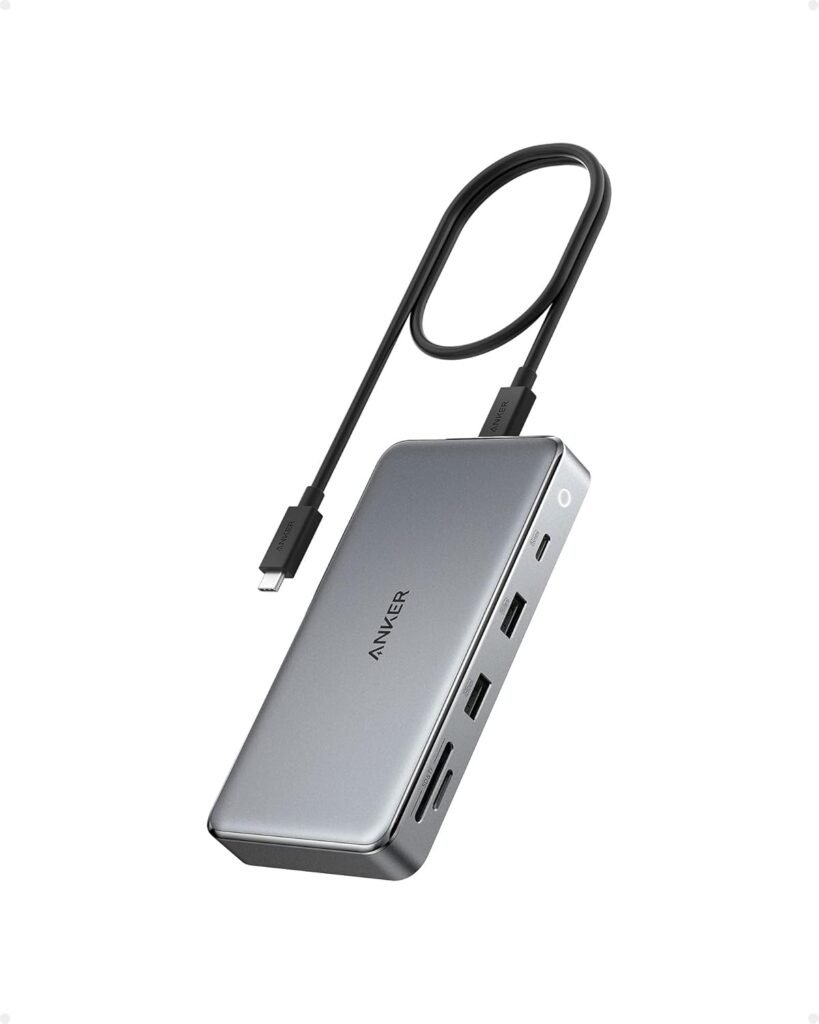
We appreciate a hub that feels solid without being bulky, and the Anker 563 strikes a good balance between durability and portability. The casing has a refined look with a matte finish that resists fingerprints, and the overall build gives a reassuring feel when we plug and unplug cables.
The unit’s form factor is compact enough to sit beside a laptop or mounted on a small docking area without dominating the desk. The integrated upstream cable that connects to the laptop is convenient, though a few of us prefer detachable cables for storage flexibility; the fixed cable is long enough for most setups. Rubber feet on the underside keep the hub stable on a desk.

Ports and layout
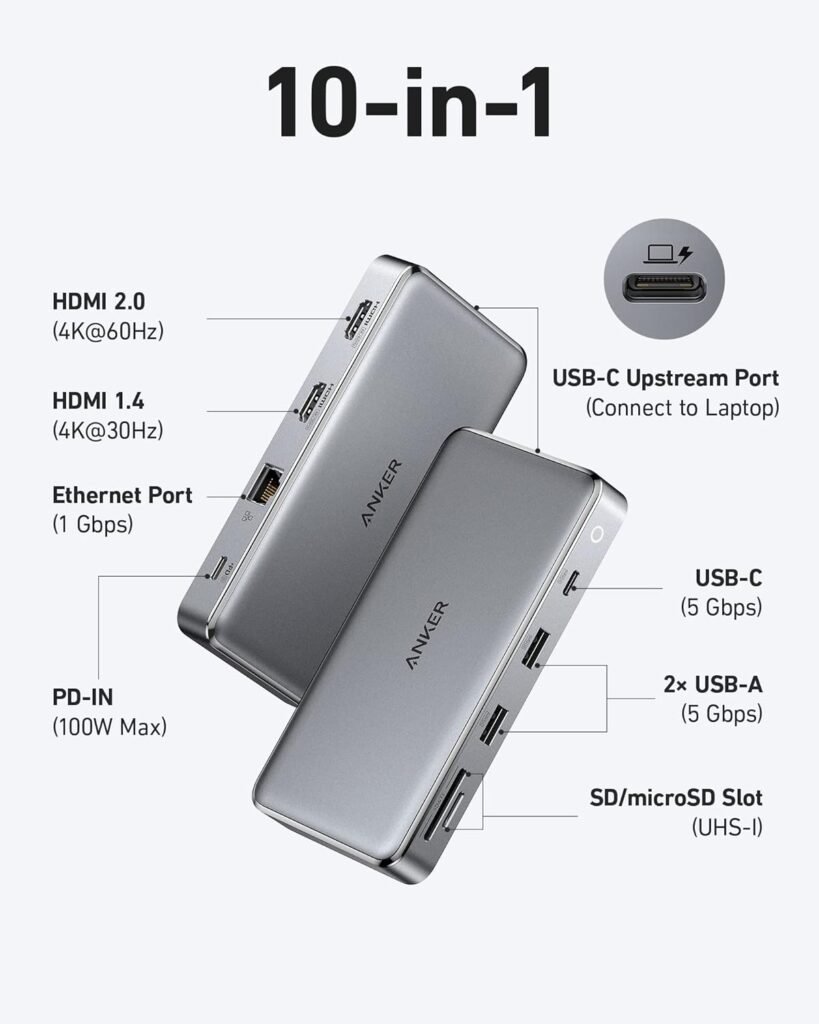
We value clarity and accessibility in port placement, and the Anker 563 lays out its connectors logically so that frequently used ports are easy to reach. The hub supplies a broad mix of video, data, card, network, and power ports that cover most workstation needs.
Here’s a clear breakdown of the ports and their primary specs to help us quickly understand what each one does:
| Port | Quantity | Key Specs | Notes |
|---|---|---|---|
| HDMI | 2 | Dual 4K output (up to 4K) | Supports dual monitor setups for extension or mirroring |
| USB-C (Upstream) | 1 | Connects to laptop (supports USB-C, USB4, Thunderbolt) | Required to connect hub to host |
| USB-C (Data) | 1 | 5 Gbps data | Data only — does not support PD charging |
| USB-A (Data) | 2 | 5 Gbps each | Great for external drives, peripherals |
| SD card slot | 1 | Standard SD | Useful for cameras and cards |
| microSD card slot | 1 | microSD | Simultaneous access possible depending on file sizes |
| Ethernet | 1 | Wired network | Ideal for stable connections; works with common gigabit networks |
| PD-IN (Power) | 1 | Up to 100W input; 85W pass-through | Requires a 100W charger to maximize passthrough to laptop |
We like that all essential ports are present and clearly labeled. The dedicated PD-IN being separate from the upstream cable is a sensible choice for maintaining power while still using the hub’s functions.
Display performance — Dual 4K HDMI
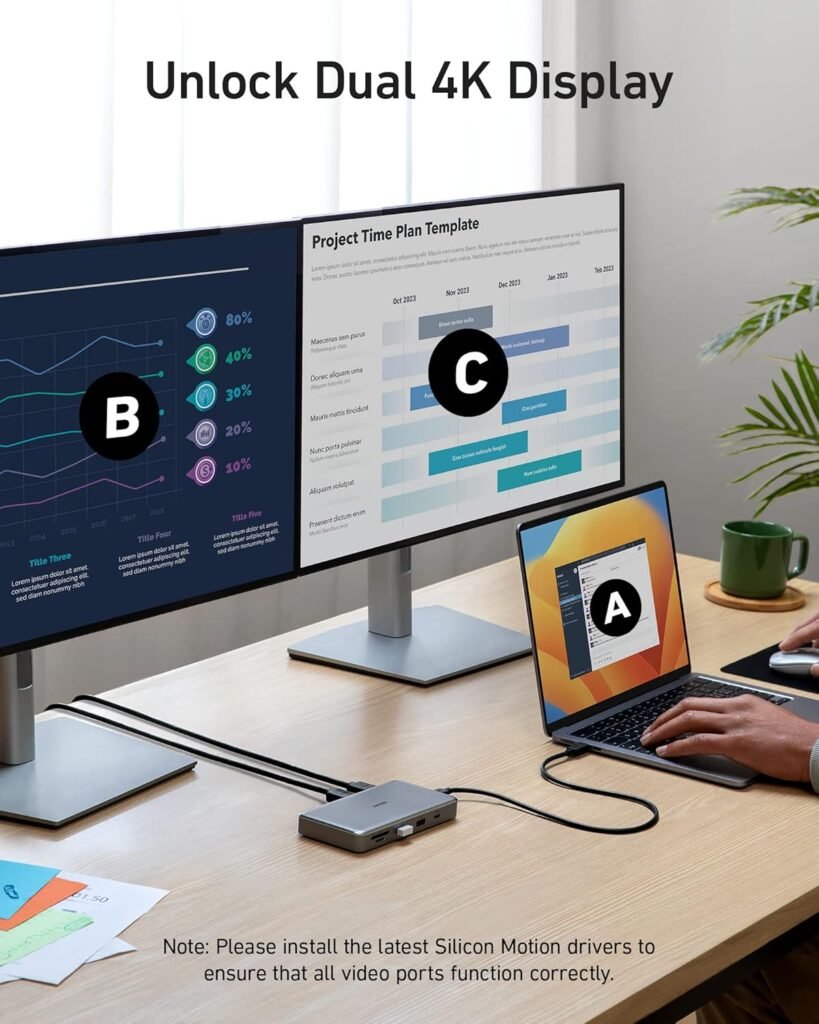
We find the headline feature—dual 4K HDMI output—very compelling for people who need multiple external displays. The two HDMI ports allow for extended or mirrored displays, which is ideal for increasing desktop real estate or presenting the same output across screens.
In practical terms, the hub supports 4K on both HDMI outputs subject to the host laptop’s capabilities and the bandwidth available through the upstream connection. On many modern laptops with DP Alt Mode support and sufficient USB-C bandwidth (or when connected via USB4/Thunderbolt), we can run dual 4K monitors at 30Hz or 60Hz depending on system limits. Higher refresh rates at full resolution may be constrained by the host’s GPU and channel bandwidth. We recommend checking the laptop’s DP Alt Mode and USB-C/Thunderbolt specifications if dual 4K at 60Hz is critical for our setup.
Data transfer and USB performance
We like fast file transfers and the Anker 563 delivers up to 5 Gbps via both the USB-C data port and the USB-A ports. This makes the hub a good match for external SSDs, flash drives, and peripherals that need a fast throughput.
It’s important to note that the USB-C data port is data-only and does not provide Power Delivery. In other words, we cannot use that data-only USB-C port to charge our laptop; only the dedicated PD-IN accepts charging input. For large file transfers, we found the 5 Gbps rating sufficient for quick backups and media transfers between external storage and the laptop.
Power delivery and charging behavior
We appreciate when a hub handles power intelligently, and the Anker 563’s power design is straightforward. The dedicated PD-IN port accepts up to 100W from an external charger, and the hub can pass roughly 85W through to the laptop while powering its internal electronics and attached devices.
To benefit from the highest pass-through output, we must connect a 100W PD charger to the PD-IN port. Lower-wattage chargers will reduce the available pass-through. We also note that only the PD-IN port supports incoming power; the USB-C data port is strictly for data and does not support charging. This split ensures clarity in operation but requires us to plan cabling and chargers accordingly.
Ethernet and network reliability
We find a reliable wired network option indispensable for many workflows, especially for streaming, video calls, or large file transfers. The Anker 563 includes an Ethernet port that provides a stable alternative to Wi‑Fi, reducing latency and offering consistent bandwidth.
On most modern networks, that Ethernet connection will operate at gigabit speeds when both the network and the laptop support it. If we rely on wired networking for work, the built-in port is a solid convenience that saves us from needing an additional adapter.
SD and microSD card support
We appreciate photographers, videographers, and content creators who move media directly from cards to a laptop without extra adapters. The Anker 563 includes both an SD and a microSD card slot, making it easy to import photos and footage.
Card access is straightforward: the slots accept common formats and deliver the typical throughput for card readers. Performance will depend on the card class and the host’s interface, but for most casual and semi-professional workflows, the built-in reader is highly convenient.
Compatibility details and limitations
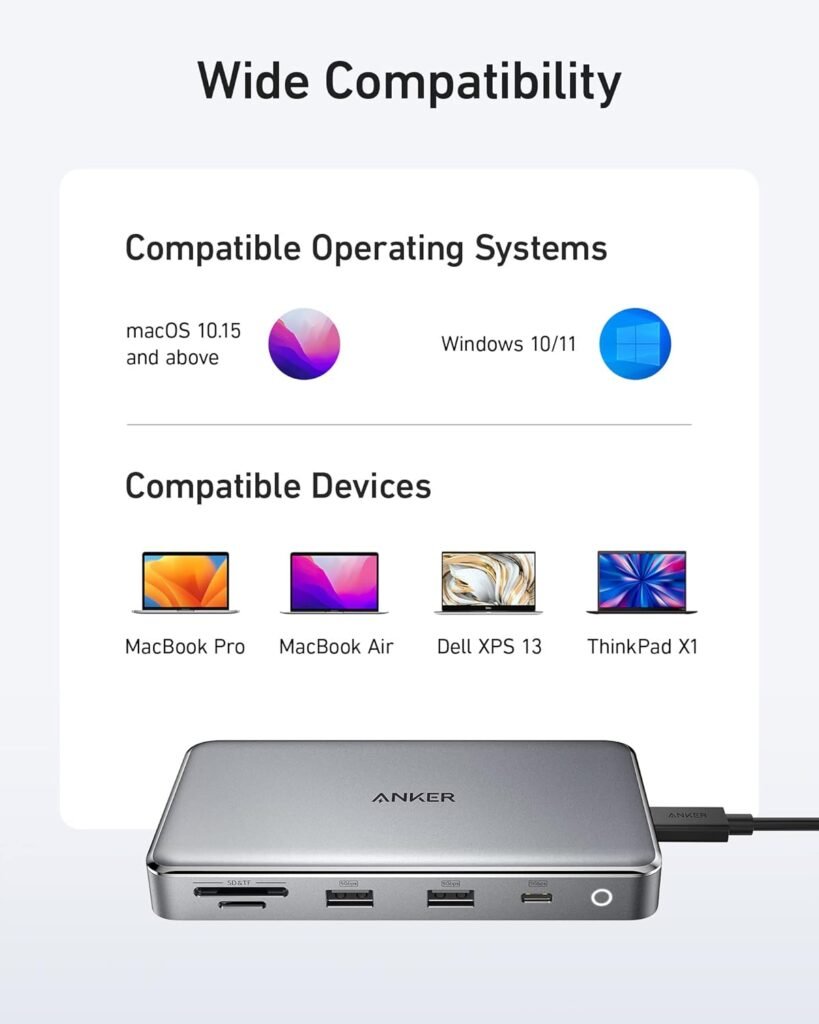
We like devices that clearly state compatibility, and the Anker 563 does that reasonably well. It supports connections through USB-C, USB4, and Thunderbolt, and it’s compatible with macOS (macOS 12 and newer), Windows 10 and 11, and ChromeOS. Devices must support DP Alt Mode and Power Delivery for full functionality.
It’s important to call out a limitation: this device is not compatible with Linux. For anyone running Linux as their primary OS, the hub will not be a suitable option. We also recommend confirming the host laptop’s USB-C port supports DP Alt Mode if multiple displays are a planned use case, because some USB-C ports only provide data and power but not video output.
Setup and day-to-day use
We find setup is generally plug-and-play. The typical sequence is:
- Connect the hub’s upstream cable to the laptop’s USB-C port that supports DisplayPort Alt Mode or Thunderbolt.
- Plug a USB-C PD charger into the PD-IN port if we want pass-through charging.
- Connect HDMI cables to monitors, attach external drives to USB ports, insert SD cards, and plug in an Ethernet cable as needed.
- On first connection, the host OS may take a few seconds to enumerate devices and configure displays.
In daily use, the hub stays out of our way while expanding capability. We should be mindful that some laptops use a single USB-C lane with limited bandwidth; in those cases, running dual 4K displays at high refresh rates while also using multiple data devices could cause contention. If we rely on high refresh rates or simultaneous heavy data throughput, testing specific scenarios with our laptop model is encouraged.
Real-world scenarios and workflow examples
We like to picture how a product fits into practical setups. Here are a few scenarios where the Anker 563 shines:
- Productivity workstation: We connect two external monitors, wired Ethernet, an external SSD, and a keyboard/mouse. The hub gives us a desktop-like experience with fewer cables on the laptop itself.
- Mobile content editing: While traveling, we keep a single compact charger in our bag and use the hub to connect a monitor and card reader when at a desk. The SD/microSD slots let us ingest media without extra adapters.
- Presentation station: For conference rooms and meeting spaces, the dual HDMI and wired network make it easy to connect a laptop and show slides on multiple displays while maintaining network access.
We find these workflows reflect the hub’s strengths: port variety, dual-display support, and integrated power handling.
Performance caveats and realistic expectations
We like to set realistic expectations so we don’t overpromise. The Anker 563 is a hub rather than a full docking station with dedicated GPU resources, so it inherits limitations from the host’s USB-C implementation.
- Dual 4K performance depends on host bandwidth: Not all laptops will support dual 4K at 60Hz due to upstream bandwidth limitations.
- PD pass-through has a practical limit: The hub accepts up to 100W input but typically provides an 85W pass-through to the laptop. That is enough for most ultrabooks and many laptops, but power-hungry gaming or workstation laptops may draw more.
- USB-C data port is data-only: We must not expect charging from the USB-C data port; only PD-IN will handle power input.
- No Linux support: This eliminates some users from being able to use the hub at all.
We appreciate the transparency about these constraints and recommend checking our laptop’s port specifications for exact compatibility.
Troubleshooting tips
We like having quick fixes at hand for common issues, and many problems have straightforward remedies.
- No display detected: Make sure the laptop’s USB-C port supports DisplayPort Alt Mode. Try swapping HDMI cables and confirm monitors are on the correct input. Restarting the laptop can force re-enumeration.
- Charging not working: Confirm a PD charger is connected to the PD-IN port (not the data-only USB-C). Ensure the charger is rated high enough (100W recommended for best pass-through).
- Slow transfer speeds: Verify the external drive supports USB 3.0/3.1 speeds and is formatted/operating correctly. Use the USB-C or USB-A 5Gbps port rather than a USB 2.0 peripheral.
- Ethernet not connecting: Check that the network supports DHCP or manually configure IP settings. Try a different Ethernet cable and ensure the host’s drivers are up to date.
If persistent issues arise, the included 18-month warranty and Anker customer service are useful for diagnosing hardware faults.
Comparison to other hubs and docks
We find it helpful to put the Anker 563 in context with common alternatives, so we can appreciate where it offers value.
- Versus single-HDMI compact hubs: The Anker 563 provides more flexibility with two HDMI outputs and more ports. It’s better when multiple displays or many peripherals are needed.
- Versus high-end Thunderbolt docks: Full Thunderbolt docking stations with dedicated PD, multiple USB-C/Thunderbolt ports, and dedicated power supplies may offer higher total wattage and expanded bandwidth. Those solutions are bulkier and costlier, while the Anker 563 is more affordable and portable.
- Versus USB-A-centric hubs: For modern laptops that favor USB-C, the 563 is more future-ready and provides PD passthrough and DP Alt Mode support.
Overall, the Anker 563 targets users who want a rich port selection in a compact package without the footprint or cost of a large Thunderbolt dock.
Pros and cons
We like to summarize strengths and weaknesses so we can quickly weigh the decision.
Pros:
- Robust port selection: dual HDMI, multiple data ports, SD and microSD, Ethernet, and PD-IN.
- Dual 4K support: Handy for multi-monitor productivity setups.
- 5 Gbps data ports: Adequate for fast external storage and peripherals.
- Compact and portable: Small footprint for travel or small desks.
- Pass-through charging: Up to 85W to laptop when supplied with a 100W charger.
Cons:
- PD-IN required for charging: Only one designated port supports PD input.
- USB-C data port does not charge: Could be confusing if expecting charging via any USB-C port.
- Not compatible with Linux: Excludes a portion of users looking for a cross-platform hub.
- Dual 4K at 60Hz may not be achievable on all laptops: Bandwidth depends on host implementation.
We find these tradeoffs reasonable for most users who need a portable, versatile hub.
Who should consider buying this hub?
We like to be specific about audience fit to make decision-making easier. The Anker 563 suits:
- Office workers and remote employees who need multiple displays, wired networking, and fast access to drives.
- Creators who require SD/microSD slots and a couple of high-speed USB ports for media ingestion and editing.
- Students or professionals who want a single compact hub for both travel and desk use.
- MacBook, Windows, and ChromeOS users who have hosts with DP Alt Mode or Thunderbolt and want a simple multi-port solution.
We do not recommend this hub for:
- Linux users, due to explicit incompatibility.
- Users who require more than 85W pass-through for high-power gaming laptops without additional charging solutions.
- Those needing very high refresh rates on multiple 4K displays if the host laptop cannot support sufficient upstream bandwidth.
Maintenance and care
We like devices that require minimal maintenance, and the Anker 563 is mostly plug-and-play. To keep it functioning well:
- Keep ventilation clear: Avoid stacking heavy items on top of the hub during extended heavy use to reduce heat build-up.
- Clean gently: Use a dry microfiber cloth to remove dust; avoid liquids and harsh cleaners.
- Cable care: Don’t sharply bend or twist the integrated upstream cable; store with gentle loops to preserve internal wires.
With basic care, the hub should remain a reliable part of our setup for years.
Warranty and customer support
We value products backed by clear support, and Anker includes an 18-month warranty with this hub. That provides peace of mind against manufacturing defects or early failures.
In addition to the warranty, Anker’s customer support is generally responsive and helpful for configuration questions and troubleshooting. We find that having direct support and a formal warranty is especially important for devices we depend on daily.
Common questions (FAQ)
We like having quick answers for common uncertainties. Below are several frequent queries and concise answers we keep handy.
Q: Can we charge the laptop through the USB-C data port? A: No. The USB-C data port is data-only and does not support power delivery. Charging is only via the dedicated PD-IN port.
Q: Will the hub work with all USB-C laptops? A: The hub works with USB-C, USB4, and Thunderbolt connections, but full functionality (especially video) requires the host to support DP Alt Mode and Power Delivery. It is not compatible with Linux.
Q: Do we need a separate 100W charger to get full pass-through? A: For the best pass-through performance (up to 85W to the laptop), we should use a 100W USB-C PD charger connected to the PD-IN port.
Q: Can we run dual 4K displays at 60Hz? A: That depends on the host laptop’s bandwidth. Some systems can achieve dual 4K at 60Hz via the host’s Thunderbolt or USB4 implementation, while others may be limited to lower refresh rates. We recommend checking host specs.
Verdict
We find the Anker 563 USB-C Hub to be a versatile, well-rounded solution for many users who want a portable hub capable of powering a dual-monitor workstation, connecting multiple peripherals, accessing SD cards, and providing a wired network. Its mix of features—dual 4K HDMI, 5Gbps USB ports, SD/microSD slots, Ethernet, and PD pass-through—hit the needs of office workers, creators, and frequent travelers.
There are some limits to recognize: the PD-IN-only charging design, the data-only USB-C port, host-dependent display limits, and lack of Linux support. For the majority of macOS, Windows, and ChromeOS users with modern USB-C or Thunderbolt ports, the Anker 563 strikes a strong balance of capability, portability, and price.
We recommend the hub for anyone seeking a compact 10-in-1 solution to consolidate cables and expand display and peripheral options—provided their laptop supports DP Alt Mode and they’re not running Linux.
Final tips for getting the most out of the hub
We like small habits that improve long-term experience. A few practical tips:
- Keep a 100W PD charger in our bag or desk if we frequently move between locations and rely on pass-through charging.
- Identify which of our laptop’s USB-C ports supports DP Alt Mode and use that as the upstream connection for the best display performance.
- For heavy multi-tasking (video editing + large file transfers + dual displays), consider a Thunderbolt dock if the laptop supports it and we need higher bandwidth and wattage.
- Label cables and keep the hub near the laptop to minimize strain on the integrated cable.
We find these small adjustments make the hub feel like a natural extension of our setup.
If we want more detail about any specific test case—such as which laptop models can reliably run dual 4K@60Hz through this hub or step-by-step setup for certain MacBooks or Windows laptops—our team can gather and summarize that information next.
Disclosure: As an Amazon Associate, I earn from qualifying purchases.