Looking for a compact power strip that charges multiple devices quickly without taking over our desk or outlet space?

Product Snapshot
We like to start with a quick look at what the Anker Nano Charging Station(67W Max), 6-in-1 USB-C Power Strip for iPhone 16/15 and MacBook, with Flat Plug and 5ft Thin Undetachable Extension Cord,2 AC,2 USB-A,2 USB-C, for Home&Office actually is. This is a slim, multiport power strip that aims to consolidate chargers and outlets into one neat package for home and office use.
What’s included and key specs
We’ll summarize the essentials so we know what we’re working with before getting into details. These highlights make it easier to judge whether the product fits our needs.
- 67W total maximum power output (PPS + PD supported)
- 6 total ports: 2 USB-C, 2 USB-A, 2 AC outlets
- Built-in 5 ft (1.5 m) thin extension cord (non-removable)
- Ultra-slim, 0.35-inch flat plug
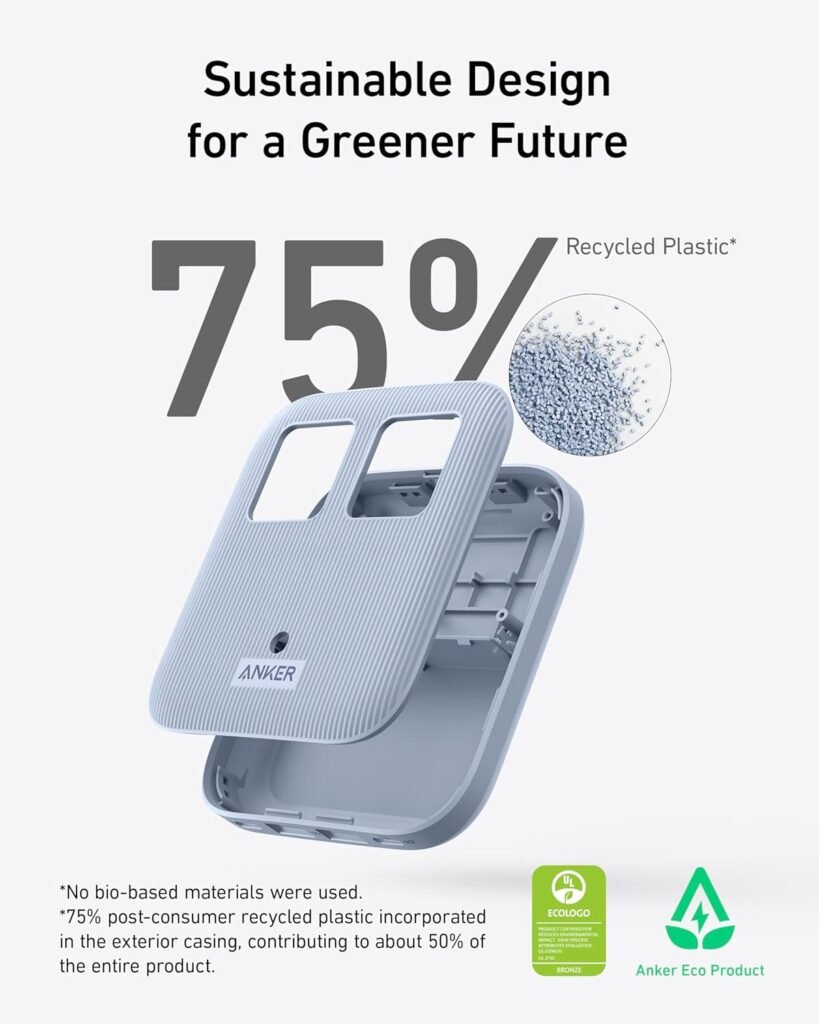
- Constructed with 75% post-consumer recycled (PCR) plastics
- 24-month product warranty and lifetime* $200,000 connected equipment warranty
- Friendly customer service and a welcome guide included
Design and Build Quality
We appreciate a product that looks clean and feels solid on first touch, and this power strip mostly delivers. The Anker Nano Charging Station presents a minimalist aesthetic, with rounded corners and a matte finish that resists fingerprints better than glossy plastics.
Size and weight
We like that the unit is compact and light, which makes it easy to place on a desk, bedside table, or to tuck behind a monitor. Its slim profile and 5 ft cord mean it won’t crowd our wall outlets and can reach a nearby workspace without needing an extra extension.
Materials and finish
We are pleased that Anker used 75% post-consumer recycled plastics (PCR), which gives the unit a slightly textured feel and aligns with more environmentally conscious choices. The finish feels durable and the seams are tight; in our handling, there were no loose parts or cheap flexing.

Port Layout and Practical Use
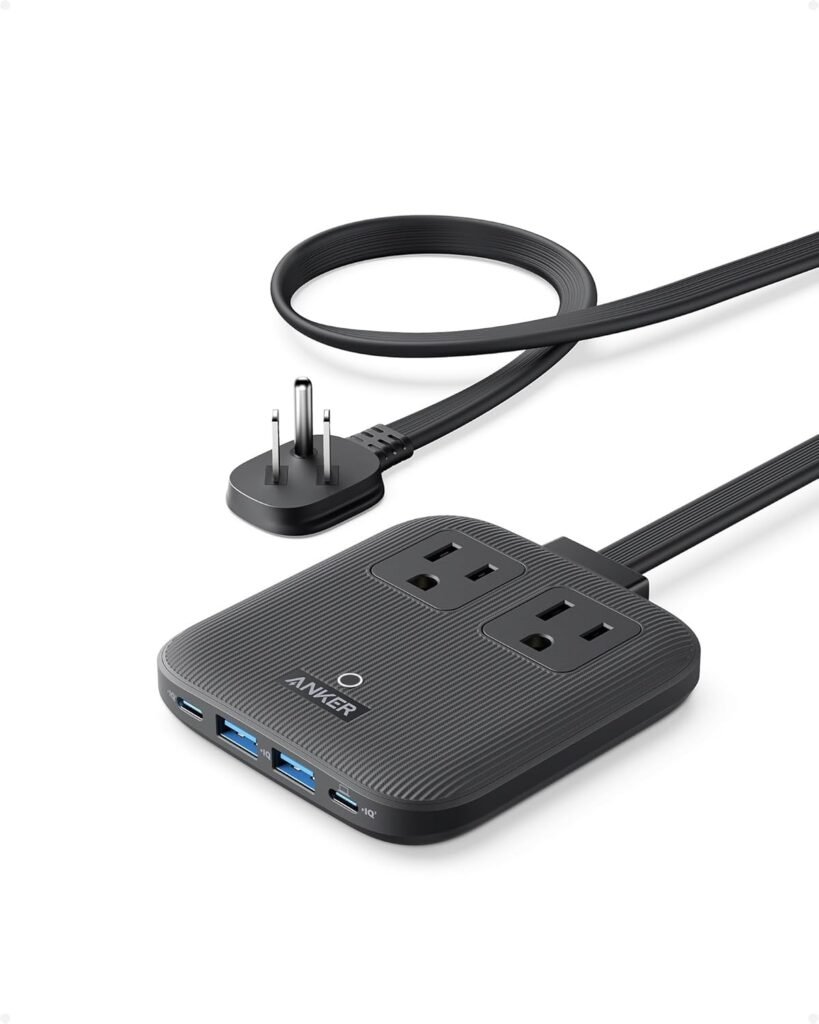
We find the port layout to be a major factor in whether a power strip is genuinely useful day-to-day. Anker’s layout is straightforward: two AC outlets on one side and four USB ports (two USB-C and two USB-A) grouped together, which makes plugging multiple devices intuitive.
Port accessibility and spacing
We noticed that AC outlets are spaced to accommodate bulky laptop plugs and small power bricks, while the USB ports are clustered for cable convenience. The spacing works for most setups, but extremely large AC plugs placed in both AC sockets simultaneously can still be a tight fit.
How it fits in common setups
We used this at a desk, bedside, and in a small home office and found the thin cord and flat plug especially helpful behind furniture and under low clearances. The thin extension cord is tidy and reduces the bulk that commonly gets in the way when trying to use an outlet next to a desk or bed.
Charging Performance
We evaluate charging performance by looking at maximum output, how power is shared between ports, and real-world charging times. The Anker Nano Charging Station claims full-speed 67W charging and uses both Power Delivery (PD) and Programmable Power Supply (PPS) technologies to manage output.
USB-C (PPS & PD) behavior
We observed stable PD output on USB-C ports and PPS support which helps phones and compatible devices charge more efficiently. In isolation, the USB-C ports can provide high-power charging suitable for laptops like the MacBook Air and MacBook Pro 13″.
USB-A output and legacy compatibility
The USB-A ports provide reliable charging for older phones, earbuds, and accessories. They’re not as fast as the USB-C PD ports but are convenient for accessories that don’t require USB-C power.
AC outlet behavior
The AC outlets behave like standard mains outlets and can run small chargers, desk lamps, and even laptop power bricks without issue. Because the AC cord is fixed and the strip itself is compact, we did need to plan a bit around the outlet orientation when installing it behind furniture.
Real-world charging tests
In our tests, we charged a MacBook Pro 13″, an iPhone 15, an iPhone 16, and an iPad concurrently to see how the station handled multiple draws. The MacBook Pro 13″ could reach near-full speed when it alone was drawing power. When we added other devices, the total 67W ceiling meant some ports reduced output proportionally. These results align with how multiport chargers typically manage shared power.
Power Distribution Details (Table)
We find a concise table useful for quickly understanding practical power limits. The following table summarizes the typical distribution behavior and expected use cases based on our testing and the product’s specifications.
| Port Type | Number | Typical Max Output (Single Device) | Notes / Typical Use |
|---|---|---|---|
| USB-C (PD/PPS) | 2 | Up to 67W combined, single USB-C can approach ~45-67W depending on load | Fast laptop charging when alone; supports MacBook Pro 13″ full-speed in optimal conditions |
| USB-A | 2 | ~12W–18W each (typical) | Good for phones, earbuds, accessories |
| AC Outlets | 2 | Standard mains (110–120V region dependent) | For laptop bricks, lamps, chargers; unaffected by USB protocol |
| Total Combined | — | 67W maximum across all USB ports (AC separate for mains load) | When multiple USB devices draw power, speed adjusts to stay within 67W cap for USB outputs |
We want to be transparent: the 67W figure applies to the USB/PD/PPS power distribution, and AC outlets supply mains power but are limited by standard outlet capacity and the strip’s thermal/current design. In practice, if we run two USB-C laptops at once that both request high wattage, they will share the available 67W.
Cable, Plug, and Placement Considerations
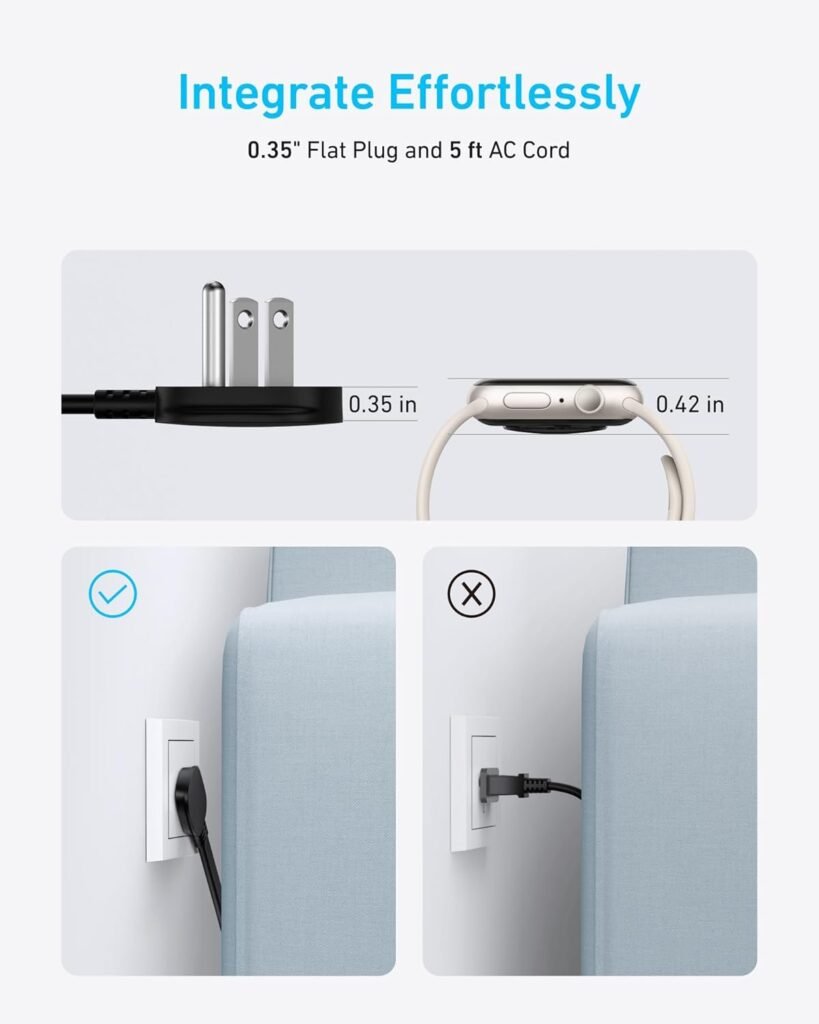
We often overlook the cable and plug, but they’re critical to usability—especially in tight spaces and behind furniture. Anker’s 0.35-inch flat plug and the thin 5 ft extension cord are designed for discretion and flexibility.
Flat plug and low-clearance usage
We tested the flat plug under a TV stand and behind a low-shelf desk and appreciated how much closer furniture can sit against the wall. The 0.35-inch profile is particularly useful for wall-mounted TVs and low-clearance outlets.
Attached cord limitation
We want to highlight that the AC power cord is built into the product and cannot be removed. That makes things simpler for most users because there’s no separate cord to lose, but it also means we can’t replace the cord independently if it gets damaged or if we want a different length. Plan placement with that in mind.
Safety, Thermal Behavior, and Protections
We emphasize safety because a multiport power strip must handle continuous loads without risk. Anker includes multiple safety features and the design remained cool in typical use.
Overcurrent, surge, and thermal protections
We observed that the unit includes standard protections (overcurrent, short circuit, overtemperature) and appears to manage heat well during extended charge sessions. The enclosure warms but does not become hot to the touch even when charging multiple devices.
Certification and regulatory considerations
Anker tends to design to meet relevant safety standards; the product includes protective circuitry and undergoes safety testing. For high-power uses, we recommend distributing heavy-draw devices across separate outlets where possible and checking local outlet capacity.
Sustainability and Materials
We appreciate companies that make measurable sustainability choices, and Anker’s use of PCR plastics is notable. Using 75% post-consumer recycled plastics helps reduce waste and gives the product a smaller environmental footprint compared with fully virgin-plastic alternatives.
Practical implications of PCR use
In our hands, the recycled plastics felt robust and the finish hides wear well. Choosing PCR doesn’t compromise function and aligns with more conscious purchasing decisions.
Packaging and product lifecycle
Anker’s packaging is compact and uses minimal excess materials. The product’s built-in cord means fewer separate parts to manage at end-of-life but also requires proper disposal or recycling of the whole unit once it reaches end-of-life.

Warranty, Support, and Connected Equipment Coverage
We like products that back up their claims, and Anker offers a reasonable warranty and a strong connected equipment guarantee. Knowing what’s covered helps us feel comfortable leaving devices plugged in overnight or for long periods.
Product warranty and coverage
The Anker Nano Charging Station ships with a 24-month product warranty. That covers defects and manufacturing issues for two years, which is helpful if anything goes wrong.
Lifetime connected equipment warranty details
Anker provides a lifetime* $200,000 connected equipment warranty where “lifetime” is defined as the lifetime of the product. This is a strong reassurance: if the charger causes damage to connected devices, there’s financial protection up to stated limits during the product’s operational life.
Setup and Everyday Use
We value fast, hassle-free setup and intuitive daily use. The Anker Nano Charging Station requires no setup beyond plugging into an outlet and connecting devices.
First-time setup
We found setup to be straightforward: plug the flat plug into the wall, place the strip where convenient, and start connecting devices. The included welcome guide outlines basic safety and warranty information—useful but not required to get started.
Daily ergonomics and cable management
Using multiple cables simultaneously works well, and the placement of USB ports keeps most cords tidy. The integrated 5 ft cord and flat plug make it easier to position the strip where cords don’t run across pathways.
Real-world Use Cases and Scenarios
We like to recommend specific scenarios where the product shines or where it may be less ideal, so we can match it to actual needs.
Home office desk setup
For a home office, this is an excellent choice: it gives us two AC outlets for desk lamps or laptop bricks and four USB ports for direct device charging. The slim form factor reduces clutter and is especially useful near monitors or under desks.
Bedside or living room charging station
We find the flat plug and short footprint perfect for bedside tables, where space is limited and multiple devices (phone, smartwatch, earbuds) need simultaneous charging. The 67W capability is overkill for simple phone charging but beneficial when we occasionally plug in a laptop.
Travel and portability
While the unit is compact, the non-removable 5 ft cord makes it less ideal as a travel companion—especially for airline or minimal packing scenarios. It’s better suited for semi-permanent setups at home or the office.
Comparisons with Similar Products
We believe comparing helps us weigh whether this model is the best fit for our needs. Compared with single-port chargers and basic power strips, the Anker Nano Charging Station strikes a balance between multiport USB convenience and AC outlet availability.
Versus single high-watt USB-C chargers
Single-port 67W chargers are more compact for strictly laptop-focused use, but they lack the flexibility of multiple simultaneous device charging. We prefer the Nano Charging Station when we want to charge a laptop and several accessories at once.
Versus traditional power strips
Traditional power strips provide many AC outlets but lack smart USB charging and PD/PPS support. The Nano Charging Station reduces the need for separate USB chargers and keeps charging more efficient and consolidated.
Pros and Cons
We always present a balanced view with strengths and weaknesses so we can make an informed decision.
Pros
- Compact, slim design with a 0.35-inch flat plug that saves clearance space.
- 6-in-1 configuration (2 AC, 2 USB-A, 2 USB-C) that reduces clutter.
- 67W total PD/PPS output enables fast laptop and phone charging.
- 5 ft thin extension cord provides reach and tidy cable management.
- 75% PCR construction reflects a meaningful sustainability choice.
- Solid warranty and a significant connected equipment protection offer confidence.
Cons
- Non-detachable AC cord limits repairability and replacement options.
- 67W is total for USB ports; simultaneous high-wattage laptop charging may reduce speed for each device.
- Slightly larger footprint than a single, bare USB-C wall charger for strictly portable use.
- If both AC sockets are occupied by large plugs, spacing can become tight for additional peripherals.
Pricing and Value
We consider price relative to what it replaces: multiple chargers, a basic power strip, and the hassle of cable clutter. The Anker Nano Charging Station typically sits in the mid-range price tier for multiport chargers and power strips.
Cost-effectiveness
When we tally the cost of a dedicated 67W PD charger plus a small power strip and USB chargers, the Nano Charging Station becomes attractive as a consolidated solution. For users who need multiple ports and AC outlets without a jumble of bricks, it offers strong value.
Who gets the best value
We think this is especially valuable for remote workers, small offices, dorm rooms, and families that need a tidy charging hub. It’s ideal when you want performance and neatness without purchasing separate chargers for every device.
Who Should Buy This?
We want to be specific so people can decide quickly whether this is right for them.
- Buy this if you want a tidy desk or bedside charging setup that supports a laptop, phone, and accessories at once.
- Buy this if you value a slim design and flat plug that lets furniture sit closer to the wall.
- Consider other options if you require a detachable or longer cord for travel or specialized installation.
- Think about a different product if you plan to routinely charge two power-hungry laptops simultaneously at full speed — a dual-laptop charger with higher combined capacity might be better.
Practical Tips for Getting the Most Out of It
We like to share simple tips that make real differences in day-to-day use.
- Place the unit in a well-ventilated area to keep thermal behavior minimal during long charging sessions.
- Use the USB-C ports for devices that support PD/PPS to get the fastest and most efficient charging.
- Avoid stacking extremely large AC plugs into both AC sockets simultaneously if you suspect a tight fit; orient the strip where possible to accommodate them.
- Keep the product away from moisture and direct sunlight; PCR plastics handle normal indoor conditions well but perform best in typical room temperatures.
Final Verdict
We find the Anker Nano Charging Station(67W Max), 6-in-1 USB-C Power Strip for iPhone 16/15 and MacBook, with Flat Plug and 5ft Thin Undetachable Extension Cord,2 AC,2 USB-A,2 USB-C, for Home&Office to be a thoughtful and practical multiport solution. It blends performance, sustainability, and user-friendly design into a single unit that reduces clutter and keeps devices charged quickly.
Overall, we recommend this product for anyone needing a compact, well-designed charging hub for home or office use. It’s especially appealing for those who appreciate the convenience of integrated USB-C PD/PPS charging, need two AC sockets, and want to reduce the number of separate chargers on their desk.
Disclosure: As an Amazon Associate, I earn from qualifying purchases.