Have we found a power strip that balances capacity, safety, and convenience for our everyday devices?
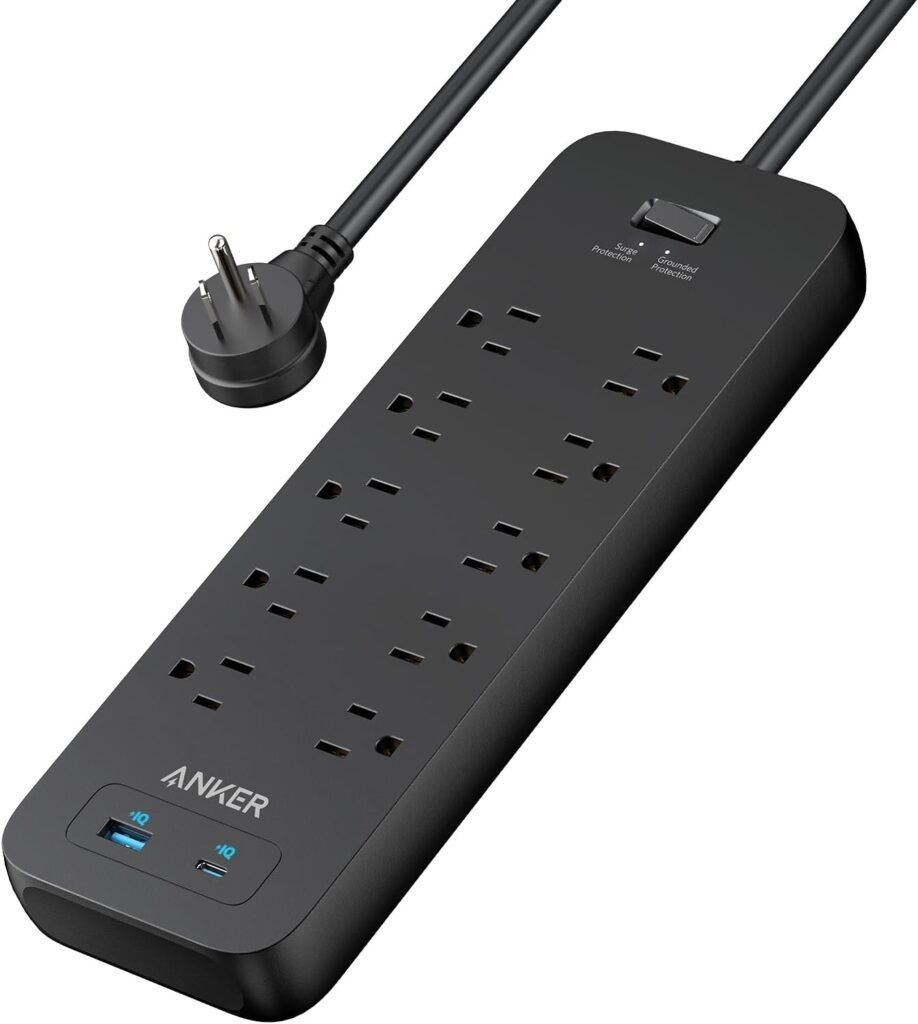

Overview of the Anker Power Strip Surge Protector(2100J), 6Ft/1.8m Extension Cord with 10 Outlets and 2 USB Ports,for iPhone 15/15 Plus/15 Pro/15 Pro Max,Flag Plug,Wall Mount Holes for Home,Office,ETL Listed, Black
We want a single power accessory that can handle multiple devices without becoming a tangle of adapters and chargers. The Anker Power Strip Surge Protector(2100J), 6Ft/1.8m Extension Cord with 10 Outlets and 2 USB Ports packs ten AC outlets, one USB-A port, and one USB-C port into a compact, mountable package and aims to protect our equipment while simplifying charging.
What this unit promises
This model aims to give us both quantity and quality: a high outlet count, a 12W USB-C charging port for modern phones, and an ETL-listed 8-point safety system with a 2100-joule surge rating. We appreciate that Anker backs the product with an 18-month warranty plus a $200,000 connected equipment warranty, which helps us feel more confident about using it with valuable gear.
Key Specifications
We think the best way to understand what the power strip offers is to see the main specs at a glance. The table below summarizes the features we most often compare when shopping for a heavy-duty power strip.
| Feature | Specification |
|---|---|
| Model Name | Anker Power Strip Surge Protector(2100J), 6Ft/1.8m Extension Cord with 10 Outlets and 2 USB Ports,for iPhone 15/15 Plus/15 Pro/15 Pro Max,Flag Plug,Wall Mount Holes for Home,Office,ETL Listed, Black |
| AC Outlets | 10 standard AC outlets |
| USB Ports | 1 × USB-A, 1 × USB-C (12W) |
| Surge Protection Rating | 2100 Joules |
| Cable Length | 6 ft / 1.8 m |
| Plug Type | Flag plug (flat) |
| Mounting | Two wall-mount holes + screws included |
| Certification | ETL Listed |
| Safety System | 8-point safety system (temperature control, short-circuit protection, etc.) |
| Warranty | 18-month product warranty; lifetime* $200,000 connected equipment warranty |
| Color | Black |
| Included in Box | Power strip, two mounting screws, welcome guide |
We find that having these numbers and features clearly listed helps us match the product to our needs quickly.
Design and Build Quality
We care about how a power strip feels and holds up during daily use, since it often sits under desks or behind entertainment centers. Anker tends to use sturdy plastics and practical design choices, and this model keeps a low profile while prioritizing outlet spacing and cable management.
Form Factor and Materials
The housing is compact but not so small that outlets crowd each other, and the finish resists fingerprints and scuffs better than glossy plastics. We like that the build feels substantial without being overly heavy, so it remains easy to move while feeling durable enough for long-term use.
Cable and Plug
The 6-foot cable gives us flexibility to reach wall sockets from different furniture layouts without trailing an extension across walkways. The flat flag plug keeps the strip closer to the wall, which is useful when outlets are behind furniture or directly under desks.


Power and Charging Performance
We want both power distribution for larger items like printers and monitors and reliable charging for smaller devices like phones and earbuds. This power strip aims to balance both by offering many AC outlets and two USB ports for direct charging.
AC Outlets
With 10 AC outlets, the strip is ideal for workstation clusters and entertainment setups where multiple power bricks and adapters are present. The outlets are spaced to reduce blocking when larger plugs or power adapters are used side-by-side, which helps us plug in everything without using up multiple sockets unnecessarily.
USB Ports and Charging Speed
The single USB-C port outputs up to 12W, which provides steady, reliable charging for most phones and accessories. While the 12W USB-C is convenient and removes the need for a separate charger for many devices, it isn’t as fast as 18W–30W USB-C PD chargers. For overnight charging or trickle-up charges during the day it works well, but for the fastest top-ups on devices that support higher wattage, a dedicated fast charger will still be preferable.
Safety Features and Certifications
We take safety seriously because a surge protector’s main job is to prevent expensive damage and reduce fire risk. The Anker strip being ETL listed and advertised with an 8-point safety system tells us Anker has included multiple protective mechanisms inside.
What 2100J Means
The 2100-joule rating is an indicator of how much energy the surge protector can absorb before it might fail to protect connected equipment. In practical terms, 2100J is a solid mid-to-high level of protection for household and office electronics, and it will typically protect devices like computers, routers, monitors, and TVs from most common voltage spikes.
8-Point Safety System Explained
Anker lists features such as temperature control, short-circuit protection, and other internal safeguards that work together to reduce hazards. We appreciate that temperature control helps prevent overheating during extended loads, and short-circuit protection provides an extra layer of defense if a flawed device attempts to draw excessive current.
Installation and Usability
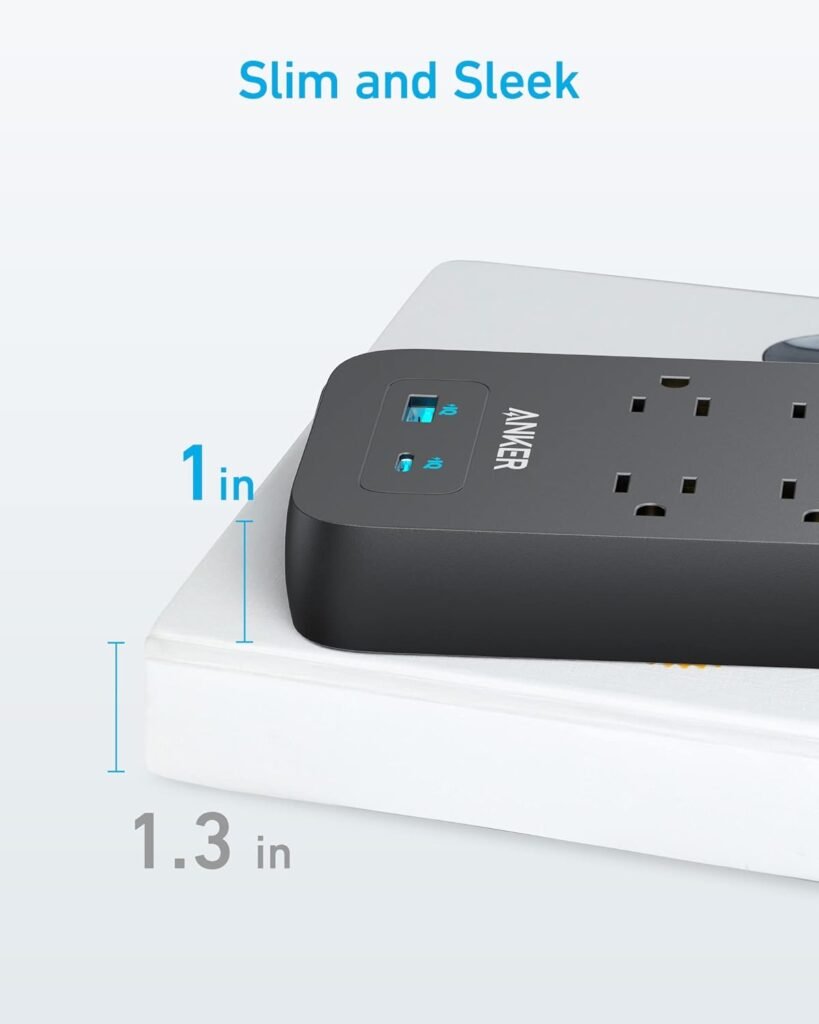
Setting up the strip should be fast and painless, and we value design elements that make day-to-day use smoother, such as mounting holes and a user-friendly outlet layout. This model includes both wall-mount holes and mounting screws, which helps it integrate neatly into many spaces.
Mounting and Placement
Using the two included screws, we can mount the strip under a desk, behind a TV stand, or on a wall for a clutter-free look. The option to mount keeps cords organized and makes it easier to access switches and ports without crawling behind furniture.
Outlet Layout and Spacing
The outlets are positioned to avoid crowding, which is especially useful when using bulky power adapters or transformer plugs. We found that accessories like phone chargers, laptop bricks, and game console adapters fit without blocking neighboring sockets in most real-world setups.
Real-World Usage Scenarios
We want practical examples of how the strip performs in daily life, so we consider common setups where we ourselves would use it. This power strip is a strong candidate for office desks, home entertainment centers, and shared living spaces where multiple devices need power and occasional charging.
Office Setup
At a desk, we can run a monitor, desktop PC, printer, desk lamp, external speakers, and a phone charger while still having spare outlets for additional devices. The presence of USB ports means we can plug in phone or tablet cables directly without occupying AC outlets with USB chargers.
Home Entertainment and Charging Multiple Devices
For living-room use, the strip can handle a TV, game console, streaming box, soundbar, and charging station for phones and controllers. We like that the surge protection reduces anxiety about plugging costly electronics into a single extension, while the flat plug lets the strip sit close to the wall behind the entertainment unit.
Pros and Cons
We find it helpful to weigh the most important advantages and drawbacks before deciding to buy. Below we outline the strengths and limitations we noticed so we can compare them against our priorities.
Pros:
- High outlet count (10 AC outlets) supports many devices at once.
- Two USB ports, including a USB-C port, reduce the need for separate chargers.
- 2100J surge protection with ETL listing and an 8-point safety system increases confidence in protection.
- 6-foot cable and flat flag plug make placement flexible and low-profile.
- Mounting holes and included screws simplify neat installation.
- Anker’s warranty and connected equipment warranty provide added peace of mind.
Cons:
- The USB-C port is limited to 12W, which is slower than many modern PD chargers.
- Only one USB-C and one USB-A port; users with many USB devices may still need extra hubs.
- The strip is relatively basic in features compared to models with USB Power Delivery or individual outlet switches.
- It’s best suited to stationary use; not the ideal travel companion due to length and form factor.
We feel that for most household or office use cases the pros outweigh the cons, but power-hungry chargers and users needing multiple high-speed USB-C ports might prefer a different solution.
Comparison with Competitors
We prefer to assess how this strip stacks up against commonly considered alternatives, so we compare general categories rather than specific models to get a sense of positioning. This helps us decide whether the Anker model meets our specific needs or if a different feature set should lead us elsewhere.
| Feature | Anker (This Model) | Typical Basic Power Strip | Typical Premium PD Power Strip |
|---|---|---|---|
| AC Outlets | 10 | 6–8 | 6–12 |
| USB Ports | 1 × USB-C (12W), 1 × USB-A | Often none or 1–2 USB-A | Multiple USB-C PD ports + USB-A |
| Surge Joules | 2100J | 300–1500J | 2000–3000J |
| Mounting | Yes (2 holes + screws) | Sometimes | Usually |
| Cable Length | 6 ft | 3–6 ft | 6 ft or longer |
| Certification | ETL Listed | Varies | ETL/UL Listed |
| Price Range | Mid | Low | Mid-High |
From our perspective, this Anker strip sits comfortably in the mid-range: more powerful and better equipped than very basic strips, but not quite as focused on high-speed PD charging as premium models with multiple PD ports. We value its balance of outlets and protection for typical home and office use.
Who Should Buy This
We think this product is best for households and small offices that need to power multiple devices while keeping some USB charging available. If we want a reliable, wall-mountable strip with strong surge protection and a high outlet count, this model is a great fit.
Not ideal for:
We would avoid this model if our main requirement is multiple high-wattage USB-C PD ports for fast charging laptops and tablets. Similarly, if we need a travel-friendly compact charger, this full-size strip may not be the best choice.
Setup Guide
We appreciate products that are simple to set up and begin using quickly, so we outline an approachable step-by-step setup process. Setting up this strip takes only a few minutes, and mounting options make it easy to keep tidy.
Unboxing and First Use
When we open the box, we should find the power strip, two mounting screws, and a quick-start guide. Before plugging it in, we recommend checking for any shipping damage and ensuring the cord and plug are intact.
Mounting on the Wall or Under a Desk
To mount, we measure and mark where the two mounting holes will go, drill pilot holes if needed, and install the included screws so the strip hangs securely. Once mounted, we route device cords neatly and avoid over-stressing the cable or running it across high-traffic floor areas.
Maintenance and Troubleshooting
We prefer devices that are low-maintenance and offer straightforward troubleshooting steps for common problems. Caring for this power strip mostly involves routine inspection and sensible load management.
Cleaning and Routine Checks
We suggest unplugging the strip before cleaning; a dry or slightly damp cloth is sufficient for the housing. Periodically inspect the cord and plug for fraying or damage, and ensure the mounting screws remain tight.
Resetting, Replacing and What to Do After a Surge
If the strip stops protecting devices after a major surge, it may need replacement; the connected equipment warranty and Anker support can guide next steps. For intermittent issues, unplug all devices, let the strip rest for a few minutes, and reconnect devices one at a time to see if a particular device or cable is causing a problem.
Warranty and Support
Having robust warranty terms is important because it affects our long-term confidence in a product that protects expensive devices. Anker includes an 18-month warranty and a lifetime* $200,000 connected equipment warranty, which reassures us that they stand behind their surge protection claims.
What the warranties mean for us
The 18-month product warranty covers defects and typical failures, while the connected equipment warranty provides financial assurance if a surge damages our protected devices under the conditions stated by Anker. We recommend reading the warranty terms and registering the product if registration is required to make warranty claims easier.
Frequently Asked Questions
We put together answers to common questions we expect people to have, based on what we would want to know before buying or using the strip.
Q: Can this power strip charge an iPhone 15 at full speed? A: The USB-C port is rated at 12W, which will charge an iPhone reliably but not at the maximum speed supported by newer iPhones that can take higher wattage via PD chargers. For the fastest charging, a dedicated USB-C PD charger of 20W or more is recommended.
Q: How many devices can we plug in at once? A: The strip has 10 AC outlets plus two USB ports, so in theory up to 12 devices can be connected simultaneously, though we should manage the total load to avoid tripping circuit breakers or overheating. Avoid plugging in multiple high-current devices that collectively exceed a typical circuit’s limits.
Q: Is the 2100J rating enough for protecting a desktop PC and monitor? A: Yes; 2100 joules is a strong rating for protecting common electronics like desktops, monitors, routers, and TVs from typical surges and spikes. It represents significant absorbed energy capacity compared with basic strips but remember that extreme lightning strikes may overwhelm most consumer-grade protectors.
Q: Can we mount this on a surge-protected power rail or another power strip? A: We do not recommend daisy-chaining surge protectors or power strips, as that can create electrical hazards and may void warranties. Instead, plug the Anker strip directly into a properly rated wall outlet.
Q: What does ETL-listed mean? A: ETL listing indicates the product has been tested and meets recognized safety standards for North America, comparable to UL listings. It gives us confidence that the strip was evaluated for electrical safety.
Q: Will the 6-foot cable create tripping hazards? A: Any cable can be a trip risk if left across walkways; use cable management techniques or route the cord along baseboards to minimize hazards. The 6-foot length is helpful for reaching wall outlets without stretching across rooms.
Q: Does the strip have an on/off switch? A: This particular model focuses on outlets and ports rather than including a main power switch; we should check the product page or manual for exact button features. If a master switch is important to us, we can choose a variant or another model that includes one.
Q: How do we know if the surge protection has been used up? A: Some surge protectors include indicator lights that show protection status; if this model has such an indicator, check the user guide for specifics. If there is no indicator and we suspect a major surge event, it’s safest to replace the strip, as protection components can degrade.
Detailed Use-Cases and Recommendations
We like to envision specific setups where the product will shine and where it might fall short so we can make practical decisions.
For Remote and Hybrid Workstations
If we work from home and have a monitor, laptop charger, hub, and peripherals, the 10 outlets let us dedicate AC outlets to bulky power bricks while charging phones directly through USB ports. The strip’s mounting options mean we can attach it under the desk to keep the workspace tidy and reduce cable clutter.
For Content Creators and Streamers
Streamers and content creators often run cameras, lighting, capture cards, and multiple monitors; the strip offers outlet quantity and enough surge protection to reduce risk. We recommend monitoring total wattage to ensure lighting rigs or other high-draw equipment don’t overload the circuit.
For Living Rooms and Shared Spaces
In a living room, we can host a TV, console, soundbar, streaming device, and charging station without using multiple wall outlets or power bricks. The strip’s black finish blends well behind media centers, and the flag plug helps it stay flush against the wall.
Safety Best Practices We Follow
We always like to adopt safe habits to get the most out of any surge protector and minimize risks.
- Avoid daisy-chaining multiple power strips or surge protectors together.
- Do not use the strip with high-current devices like space heaters or window AC units that exceed standard ratings.
- Periodically inspect the cord and housing for damage; replace if any fraying or unusual wear is present.
- Mount the strip in a ventilated location and avoid covering the unit with soft materials that can trap heat.
- Keep liquids away from the strip to prevent short circuits or corrosion.
These practices help us maintain safety and prolong the life of both the strip and our connected gear.
Final Thoughts
We feel the Anker Power Strip Surge Protector(2100J), 6Ft/1.8m Extension Cord with 10 Outlets and 2 USB Ports,for iPhone 15/15 Plus/15 Pro/15 Pro Max,Flag Plug,Wall Mount Holes for Home,Office,ETL Listed, Black is a strong, practical choice for most home and office environments. Its combination of a high outlet count, solid surge protection, ETL certification, and mounting convenience makes it a versatile option for anyone looking to tidy and protect multiple devices without adding a clutter of chargers.
If our priority is a balance between outlet capacity and protection with some USB convenience, we would recommend this Anker model; if we need multiple high-wattage USB-C PD ports for laptop charging, we might consider a different power strip designed specifically for PD charging. Overall, the unit serves as a reliable, well-built centerpiece for powering and protecting a wide range of everyday electronics.
Disclosure: As an Amazon Associate, I earn from qualifying purchases.