Disclosure: As an Amazon Associate, I earn from qualifying purchases.
Have we ever wished we could manage our backup power system from the couch instead of walking out to the garage or down into the basement every time?
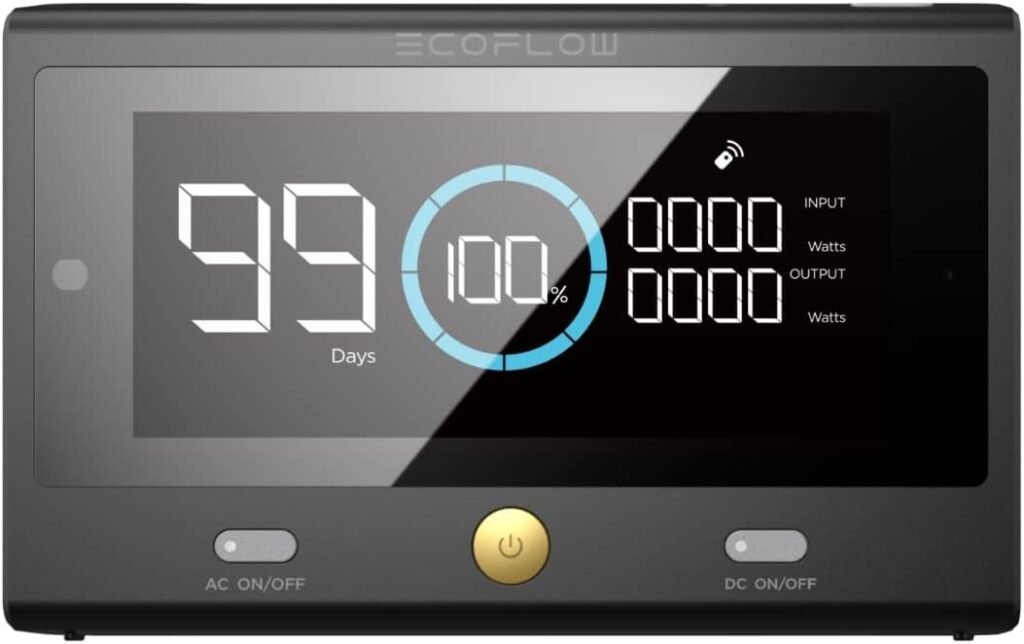

What Is the EF ECOFLOW Delta Pro Remote Control?
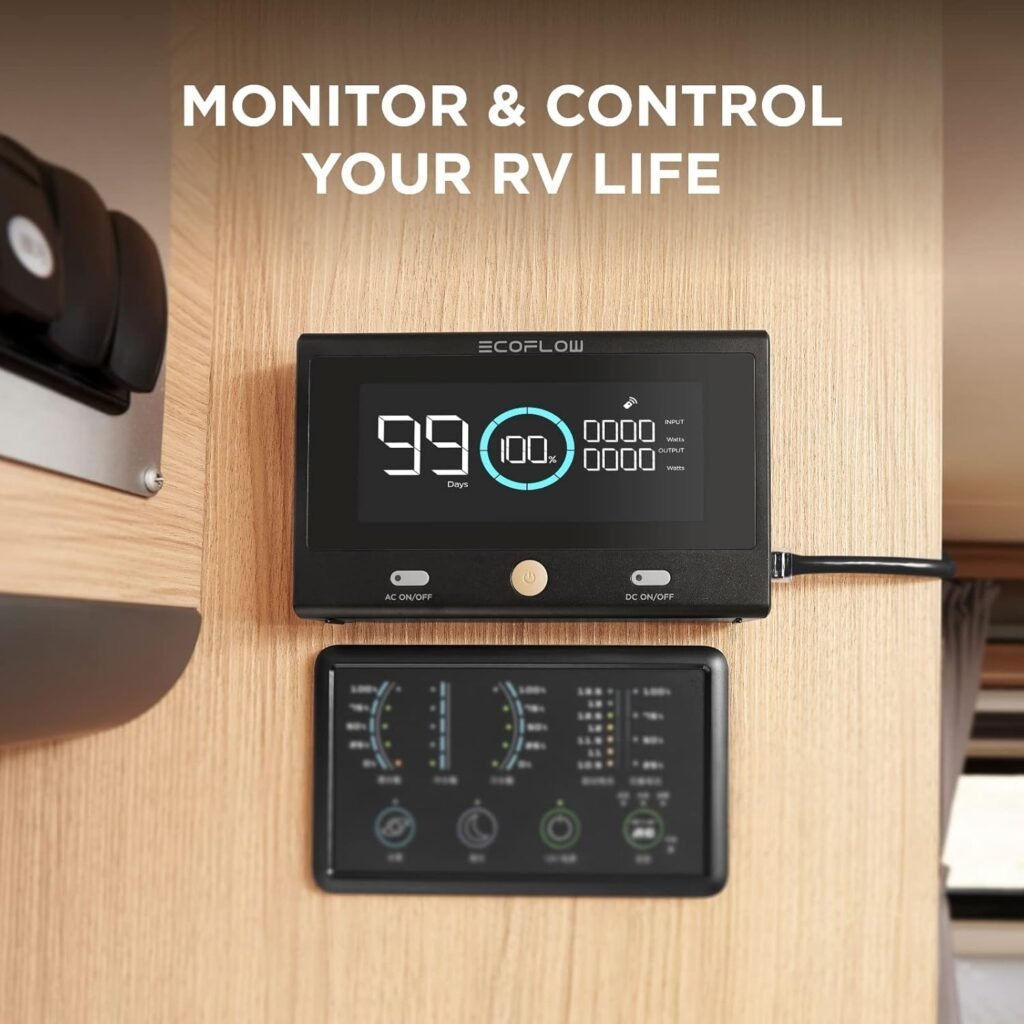
The EF ECOFLOW Delta Pro Remote Control is a dedicated, secondary control screen and command center for the ECOFLOW DELTA Pro portable power station. We connect it either by Bluetooth or ethernet cable and gain full access to almost everything we see and do on the main unit’s screen.
Instead of bending over the big battery or hunting for it in a storage bay, we mount or place this remote screen where it is convenient. From there, we can monitor energy flow, check remaining runtime, and switch AC or DC outputs on or off without touching the main DELTA Pro.
Who Is This Remote Control Really For?
We find this accessory aimed at anyone who keeps their DELTA Pro in a spot that is not easy or pleasant to reach. That might be a garage, RV storage compartment, shed, under a desk, or below deck on a boat.
It especially makes sense if we:
- Use our DELTA Pro as part of a home backup setup
- Rely on solar panels feeding into the unit
- Keep the unit semi-permanently installed somewhere out of sight
If we ever thought, “We wish this screen was inside the house or right by our workbench,” then we are basically the target user.

Key Features at a Glance
To get a quick picture of what this accessory actually does, it helps to look at the main features side by side. This gives us a simple overview before we go into deeper detail later on.
| Feature | What It Means for Us | Why It Matters |
|---|---|---|
| Secondary full-color display | A mirror of the DELTA Pro’s screen in a compact unit | Lets us check status without going to the main unit |
| Bluetooth connection | Wireless connection over a shorter range | Lets us move the remote screen around easily |
| Ethernet (wired) connection | Wired connection for more stable, longer distance setups | Ideal for garages, RV bays, or where Bluetooth might be weak |
| Power station control | Turn AC outlets, DC outlets, or the entire unit on/off | Saves us trips and makes power management more convenient |
| Real-time energy monitoring | See power usage, battery percentage, remaining runtime, and more | Helps us plan energy usage and protect our battery |
| Designed exclusively for DELTA Pro | Tailored firmware and interface for one specific power station | Ensures compatibility, stable behavior, and a seamless user experience |
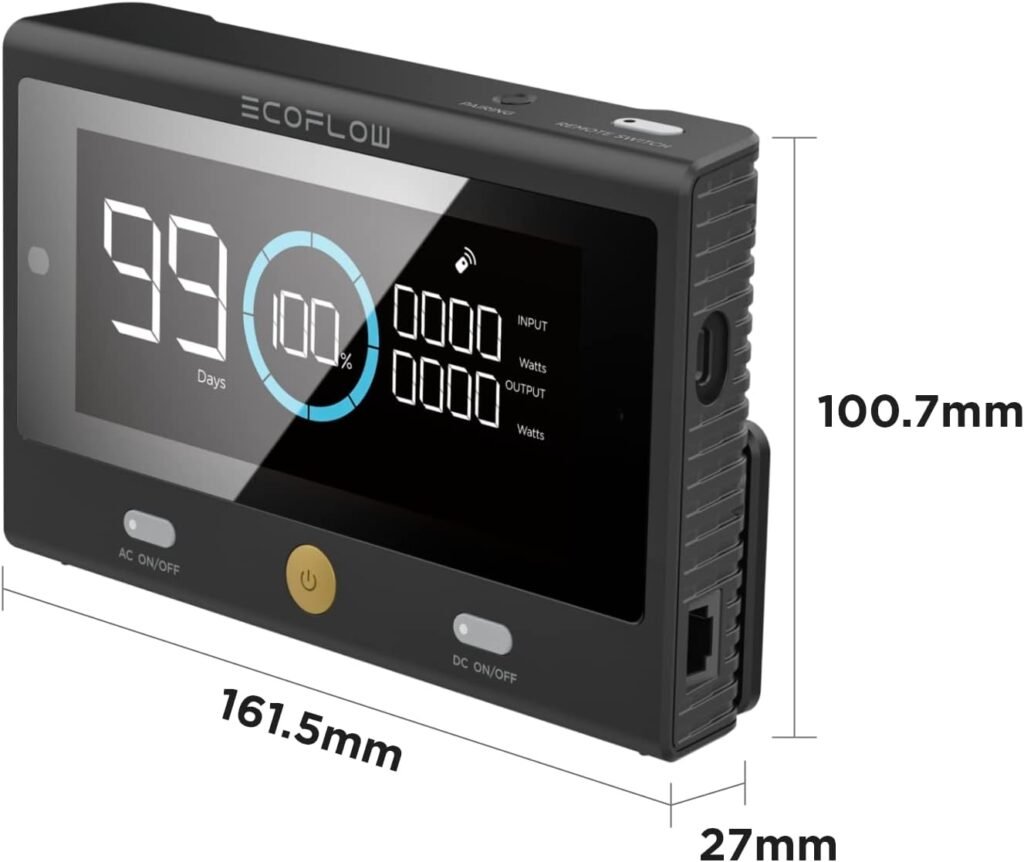
| Compact and mountable design | Small footprint, easy to place on a desk or mount on a wall | Keeps our control center neat and accessible |
We can think of it as a remote dashboard and control pad that extends our DELTA Pro’s brain into whatever room we spend the most time in.
Design and Build Quality
The remote control looks like an extension of the DELTA Pro itself. It keeps the same design language: clean lines, a clear display, and a focus on function rather than flashy aesthetics.
Look and Feel
When we first pick it up, it feels like a solid, purpose-built device rather than a cheap add-on. The housing feels sturdy enough for daily use in a workshop, RV, or household environment, and the overall appearance lines up well with other ECOFLOW devices.
The display is sized and laid out so we can glance at it from a short distance and still understand what is going on. We do not need to stand with our nose against the screen to see the data, which makes it more practical in real-world setups.
Build Quality and Durability
This device is not meant to be tossed around, but it feels like it can handle bumps, the occasional knock, and frequent handling. For stationary use on a shelf, wall, or control panel area, it is more than sturdy enough.
We would still avoid leaving it in environments with extreme moisture or direct rain. It is designed for indoor or protected areas like inside an RV, in a cabin, on a boat interior, or in a garage without exposure to harsh weather.
Setup and Installation Experience
Setting up the EF ECOFLOW Delta Pro Remote Control is fairly straightforward, particularly for anyone who has already used the DELTA Pro and is comfortable with basic device pairing or plugging cables in.
Initial Connection Options
We can connect the remote control to the DELTA Pro in two main ways:
-
Bluetooth (wireless)
We pair the remote with our DELTA Pro using Bluetooth. The steps are roughly:- Power on the DELTA Pro
- Power on the remote control
- Put both in pairing mode according to the manual
- Select the DELTA Pro on the remote screen and complete the pairing
This approach is great if the DELTA Pro is in the same room or just a wall away and we like the freedom to move the remote screen around.
-
Ethernet (wired)
We use an ethernet cable to create a direct, wired link between the remote and the main unit. That gives us:- A more stable connection over longer distances
- Less interference than Bluetooth might encounter
- A “set it and forget it” connection for semi-permanent installations
This works especially well if we have the DELTA Pro in a basement, side room, or vehicle storage compartment and we want a fixed control point in a living room or kitchen.
Ease of Mounting and Placement
We typically have three main ways we might use it:
-
On a table or shelf
We simply place it where we want. This is the easiest option and works well if we like to move it occasionally. -
Mounted on a wall or control panel
If we are building a more permanent power station nook, wall mounting the screen makes our setup feel like a professional control center. This is a logical choice for home backup power rooms, RV command panels, or boat cabins. -
Near frequently used devices
We might keep it by our computer desk, near our TV, or in the kitchen, so we can glance at our remaining runtime while going about daily life.
We should keep cable routing in mind if we use the ethernet option, since we need a path between the DELTA Pro and the remote screen that does not get in the way.
Everyday Usability and Interface
The true value of the EF ECOFLOW Delta Pro Remote Control shows up in daily use. The more we rely on our DELTA Pro, the more we start to appreciate having that status screen right where we are.
Screen Layout and Readability
The interface on the remote closely matches the DELTA Pro’s onboard display. That means we do not need to relearn anything. The information we are used to seeing—battery state of charge, input and output wattage, estimated remaining runtime—is right there.
We can usually read:
- Remaining battery percentage
- Estimated hours or minutes left at the current load
- Real-time input from solar, AC, or other charging sources
- Real-time output power usage across AC and DC ports
The brightness and clarity are good enough for indoor spaces and dim environments. In very bright sunlight the screen can be harder to read, so for outdoor or very bright rooms, we might try positioning it in a slightly shaded spot.
Controls and Responsiveness
Beyond just a status screen, this remote lets us actively control the DELTA Pro. We can:
- Turn AC outlets on or off
- Turn DC outlets on or off
- Power the entire unit on or off (where supported)
The response over both Bluetooth and ethernet is generally fast. Ethernet usually feels more instant and reliable, especially through walls or over longer distances, but Bluetooth performs well at normal household ranges.
By letting us flip outputs with a button press from indoors, it becomes easier to manage power-hungry devices. We might switch off a group of loads when we realize the battery is dropping more quickly than we want, without going out to the physical unit.
Bluetooth vs Wired Connection: Which Is Better?
Both connection methods have trade-offs. It helps to think about our specific setup and movement patterns before deciding how to use it.
When Bluetooth Makes More Sense
Bluetooth gives us a wireless link that is perfect for:
- Short-range setups in the same room or nearby space
- Situations where we like to move the remote around
- Temporary installations, such as camping or short trips in an RV
We can keep the remote on the coffee table today and move it to our home office tomorrow, as long as the DELTA Pro remains in range. This is ideal when we do not want to run cables or make anything permanent.
We just need to remember that:
- Bluetooth range is limited
- Thick walls or metal structures can weaken the signal
If our signal occasionally drops, we can usually re-establish it fairly quickly, but for critical always-on monitoring, a wired link is the more dependable choice.
When Ethernet (Wired) Shines
Ethernet might be our preferred choice if:
- The DELTA Pro is far from where we want the remote screen
- We value absolute reliability over flexibility
- We are building a more fixed system in our home, RV, or boat
A wired connection is generally more stable and less prone to interference. If we have the path to run a cable, we gain peace of mind that the remote will stay connected, even if Bluetooth gets blocked by walls, metal, or distance.
In a home backup scenario, where our DELTA Pro might live in the garage or basement, having the remote mounted in the kitchen or living room via Ethernet can turn it into a proper home energy monitor.
Monitoring Our Energy in Real Time
One of the main reasons to add this remote to our system is the ability to see what is happening in real time, without walking to the power station. That can change how we think about—and use—our stored energy.
Battery Status and Remaining Runtime
We can always see the current battery percentage. More importantly, we see an estimate of how long that battery will last given the current power draw. That is incredibly helpful when:
- We are in a power outage and need to ration energy
- We are camping or off-grid and want to know if we can make it through the night
- We are running high-wattage tools or appliances and want to time their usage
Being able to check this from indoors or from our RV living space makes our usage decisions quicker and more informed.
Input and Output Tracking
Beyond battery life, the remote shows us input and output wattage. This lets us:
- See how much power our solar panels are producing in real time
- Confirm that the DELTA Pro is actually charging when plugged into AC
- Measure how much draw certain devices or combinations of devices create
For example, if we plug in a portable heater or an air conditioner, we can watch the output spike and instantly understand how quickly that will drain the battery. That can prompt us to adjust our usage before we run into a problem.
Control From Afar: Real Use Cases
Being able to both monitor and control the DELTA Pro from a distance opens up some very practical scenarios. It is not just a neat gadget; it can meaningfully improve how we live with our power system.
Home Backup and Emergency Power
In a residential setup, we might keep our DELTA Pro in the garage or utility room, wired to critical circuits or used as a plug-in backup for appliances. The remote screen inside the living area lets us:
- Keep an eye on how long our power reserve will last
- Switch off outlets powering non-essential loads during an outage
- Confirm that solar or AC charging is working after the grid comes back
Instead of checking the unit physically in the dark or bad weather, we stay inside and manage everything with a few button presses.
RV, Vanlife, and Travel
For RV owners, vanlifers, and frequent travelers, the remote can become our onboard power panel. We might store the DELTA Pro in a lower storage compartment or under a bed, then place the remote near the driver’s seat or dining area.
From there, we can:
- Turn AC outlets on to run a coffee maker or induction cooktop
- Watch how solar panels are charging while parked at a campsite
- Keep track of battery levels overnight without lifting cushions or opening storage bays
This is especially helpful when we are boondocking or staying off-grid; the remote gives us a centralized view of our entire energy situation.
Boats and Off‑Grid Cabins
Below-deck storage on a boat or in a cabin can be awkward to access. The remote screen fits nicely into that environment by:
- Staying dry and safe inside a protected cabin or main room
- Providing at-a-glance updates on battery safety and status
- Allowing us to shut off loads when the weather changes and solar falls off
For off-grid cabins where the DELTA Pro might sit near the battery or solar combiner, having a remote inside the living space can keep us from trudging through snow or rain just to see if we should turn off a space heater.
How It Compares to Using the ECOFLOW App
ECOFLOW also offers a mobile app that can control and monitor the DELTA Pro over Wi‑Fi or Bluetooth. So where does the EF ECOFLOW Delta Pro Remote Control fit in when we can already use our phone?
Advantages of the Dedicated Remote Screen
We see several benefits in having this dedicated device:
- Always-on presence: We can leave it in a fixed spot like a wall or desk, so anyone in the home or RV can see the current status at a glance without unlocking a phone.
- Simple, focused interface: The screen is built just for this task. There are no notifications, no distractions, just our power data.
- No battery worries: Unlike a phone, this remote is tied into our system power. We do not have to worry about its battery dying when we need it most.
- Easier for multiple users: Family members, guests, or crew can access it easily without installing apps or logging into accounts.
When the App Might Still Be Better
The app is still valuable and might be more convenient when:
- We are away from the house or vehicle and want to check status (where remote monitoring is supported)
- We prefer to control the unit from our phone no matter where we are in the building
- We want remote firmware updates or advanced settings not exposed on the physical screens
In reality, both the app and the remote screen can coexist. We might use the app when we are out and about and rely on the remote control as our “wall-mounted energy dashboard” at home.
Pros and Cons of the EF ECOFLOW Delta Pro Remote Control
Like any accessory, this remote brings several benefits but also some limitations. Putting them side by side helps us decide if it is the right upgrade.
What We Appreciate
- True convenience: We no longer need to visit the DELTA Pro every time we want to check status or toggle an outlet.
- Better energy awareness: Having a status screen in our main living or working space makes us more mindful of power usage.
- Flexible connection methods: The choice of Bluetooth or ethernet lets us adapt to different environments.
- Good integration: Because it is purpose-built for the DELTA Pro, the interface feels consistent and intuitive.
- Useful for many scenarios: Works well for home backup, RV, boating, off-grid cabins, garages, and workshops.
Where It Falls Short
- Single-device focus: It is specifically designed for the DELTA Pro. If we have multiple different ECOFLOW units, we may not get the same level of universal control from one remote.
- Additional cost: It is not essential for the DELTA Pro to function. This is an enhancement, which adds to the overall budget.
- Requires physical line or reasonable range: Wired mode needs cable routing; Bluetooth mode needs a decent line of communication through walls or around metal.
- Not a full app replacement: Some advanced functions or cloud-based features remain better handled by the mobile app.
Despite these trade-offs, for many DELTA Pro owners, the convenience alone may justify adding the remote to the system.
Situations Where This Remote Makes the Most Sense
We find that certain real-world setups benefit much more from this accessory than others. If we recognize our own situation here, then it is probably worth serious consideration.
Fixed Home Backup Systems
If our DELTA Pro is semi-permanently installed as part of a home backup system, especially in a room away from our daily living area, we stand to gain the most.
We can keep the remote:
- In the kitchen to check runtime during outages
- Near our main entryway to glance at energy usage on the way out
- In a home office if we use the DELTA Pro to support critical electronics
In this scenario, the remote becomes a household status board, saving us time and giving us constant awareness of our energy reserve.
RVs and Mobile Homes
Anyone who stores the DELTA Pro in a compartment, under seats, or in a rear space will appreciate bringing the control panel forward.
We might place the remote:
- Above the dinette table
- Near the main control switches for lights and tanks
- Next to our bed for nighttime checks
This is not just about convenience; it helps us extend our boondocking time by making it easy to respond when the battery starts dropping faster than expected.
Tiny Homes, Workshops, and Sheds
In smaller or multi-use spaces, we might tuck the DELTA Pro away to avoid clutter. A remote screen on the wall or workbench:
- Keeps us informed without dragging equipment out
- Helps us manage tool and appliance use more intelligently
- Makes the whole setup feel more like a built-in system than a loose portable device
For makerspaces, hobby shops, and backyard offices, this remote can become part of a neat, functional power station corner.
Practical Tips for Getting the Most Out of It
Once we decide to use the EF ECOFLOW Delta Pro Remote Control, a few simple choices can help us squeeze more value out of it.
Place It Where We Actually Look
The best location is where we naturally walk or sit often. Some ideas:
- Near our main light switches or thermostat
- By the door we use most often
- On a wall facing our desk in a home office
- Next to the kitchen counter or dining area in an RV
If we see the display in our normal line of sight, we are more likely to use it proactively instead of treating it as a forgotten gadget.
Choose Connection Type Based on Distance and Reliability
A simple rule of thumb can guide our choice:
- If the DELTA Pro is close (same room or next room) and we like flexibility: start with Bluetooth.
- If the DELTA Pro is far (garage, basement, or storage bay) or we need a constant, unbroken link: use ethernet for a wired connection.
If we notice occasional dropouts with Bluetooth, we can always upgrade the setup with an ethernet cable once we know where we want the remote to live.
Use It as a Teaching Tool for Energy Awareness
Having a visible, understandable readout of power usage is a great educational tool. We can:
- Show our family how different appliances affect power draw
- Watch how much solar is coming in during different times of day
- Learn which devices quietly draw more energy than we realize
By building this awareness, we naturally start making better decisions about what we run and when we run it, which extends our stored energy.
Reliability and Long‑Term Experience
While the remote is a relatively simple device compared to the DELTA Pro itself, its usefulness depends heavily on reliability and stability of connection.
Day-to-Day Stability
In normal use, once we establish a connection, the remote tends to maintain it well, especially over ethernet. Reconnection after power cycles or after moving the remote is usually quick.
Bluetooth quality can vary with physical layout:
- In open spaces and through light interior walls, it usually holds well.
- Through concrete, metal, or multiple thick walls, we might see weaker performance.
That is why we see the wired option as a key strength for more demanding or spread-out installations.
Firmware and Compatibility
Because this is designed specifically for the DELTA Pro, compatibility is usually straightforward. Firmware updates on the DELTA Pro sometimes bring improvements that also benefit how the remote interacts with the unit.
We should keep both the DELTA Pro and the remote firmware up to date when updates are available, to ensure smooth communication and access to any new interface enhancements.
Is the EF ECOFLOW Delta Pro Remote Control Worth It?
The value proposition comes down to how heavily we rely on our DELTA Pro and how inconvenient its usual location is. We can think about it in a few simple questions:
- Do we keep our DELTA Pro out of sight, in a place that is annoying to reach?
- Do we use the DELTA Pro regularly for backup power, off-grid living, or travel?
- Do we want a simple way for multiple people in our household or vehicle to see and control power usage?
If the answer to those questions is yes, then this remote control is more than a novelty; it becomes a daily convenience.
For lighter, occasional use, where the DELTA Pro is always within reach and easy to see, the remote might feel like a nice-to-have rather than a must-have. In that case, we might be better served by the official app and walking over on the rare times we need direct control.
Final Thoughts
The EF ECOFLOW Delta Pro Remote Control is essentially our remote dashboard and control panel for one of the most capable portable power stations on the market. It is not trying to be flashy; it simply takes the information and controls we already have on the DELTA Pro and puts them where we actually live and work.
We gain:
- Constant awareness of our energy situation
- Easier management of AC and DC outputs
- The flexibility of wireless convenience or the security of a wired connection
- A more integrated, “built-in” feel for our backup or off-grid power system
For those of us who depend on our DELTA Pro as more than just an occasional backup—whether in a home, RV, boat, or cabin—this remote control can make our power system feel less like a box in the corner and more like a natural, visible part of our everyday life.