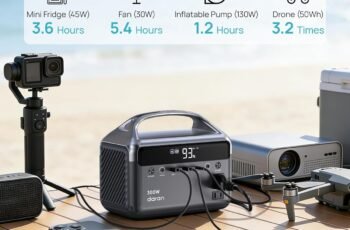
When we’re working on the go, the right portable power station can mean the difference between a smooth session and a dead battery. In 2025, compact units with quiet fans, true sine-wave AC, and fast USB‑C PD make all the difference for laptops. We’ll compare five standout options—from ultra‑portable to high‑capacity—plus key buying factors like LiFePO4 longevity and pass‑through support. Let’s see which one actually keeps us productive without the bulk or noise.
Key Takeaways
- Prioritize pure sine wave AC and 60–100W+ USB‑C PD to safely and efficiently charge modern laptops without adapters.
- Match continuous AC output to your laptop’s sustained draw with headroom; 300W stations suit most ultrabooks, higher for power-hungry models.
- LiFePO4 batteries (e.g., River 2 Max, Jackery 1000 v2) offer far longer cycle life and better thermal stability than lithium‑ion.
- Fast recharge matters: look for 1–2 hour AC refills and MPPT solar support for reliable uptime on the go.
- Balance portability and capacity: ultralight units (<2.5 lb) trade runtime, while 6–24 lb stations add versatility, quiet cooling, and more ports.
ALLWEI Portable Power Station 300W (280Wh)
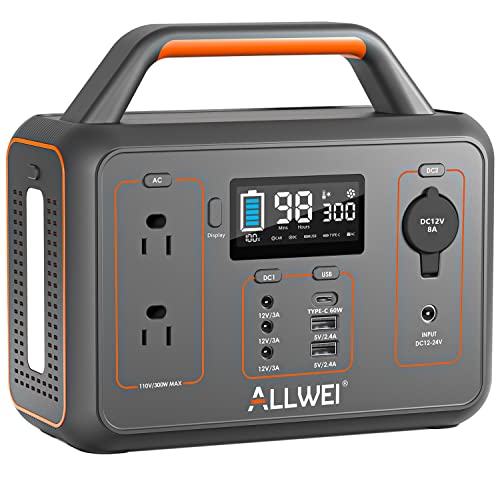

If you want a compact, quiet power station that can handle a full workday on a laptop plus essentials, the ALLWEI 300W (280Wh) stands out with its 110V pure sine wave AC and versatile I/O: two AC outlets, a 60W USB-C PD port, two USB-A, three DC ports, and a car socket. We appreciate its 6.5-pound build, 9 x 4.7 x 7.8-inch footprint, and silent cooling fan. Expect about 280Wh x 85% divided by your device’s watts for runtime. It recharges via wall (5.5–6.5h), car (4.5–5.5h), or 100W solar (3–4h) with MPPT. BMS protections, 1500 cycles, and a handy SOS light round it out.
Best For: Campers, remote workers, and emergency-prep users who need a lightweight, quiet 300W portable power station with versatile ports and fast solar/car/wall recharging.
Pros:
- Versatile outputs: 2 AC (pure sine), 60W USB-C PD, 2 USB-A, 3 DC, and car socket; supports up to 9 devices simultaneously
- Portable and quiet: only ~6.5 lb with compact 9 x 4.7 x 7.8-inch design and smart silent cooling fan
- Flexible, fast recharging: wall (5.5–6.5h), car (4.5–5.5h), or 100W solar (3–4h) via built-in MPPT; long-life lithium-ion (1500 cycles)
Cons:
- Limited to 300W continuous (600W surge), not suitable for high-draw appliances like microwaves or hair dryers
- Real-world capacity reduced by conversion losses (estimate runtime as 280Wh x ~85% / device watts)
- Solar panel not included; fan noise may be noticeable under higher loads
MARBERO Portable Power Station 88Wh (Solar Panel Optional)
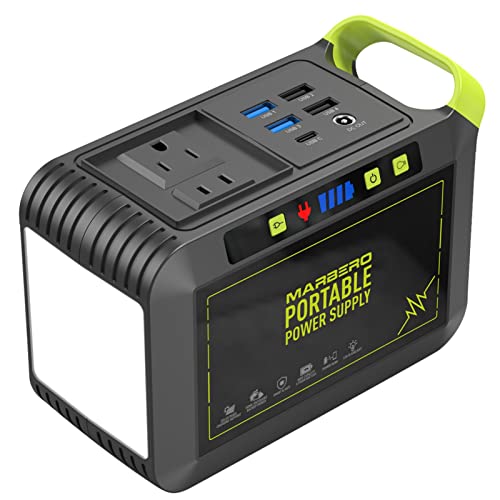
Looking for an ultra‑portable laptop companion under 2.5 lb with real AC power? MARBERO’s M82 (88Wh) packs 80W output with 120W peak into a compact 6.5 x 4.6 x 3.1‑inch shell and an ergonomic handle. We like the eight outputs—AC, DC, USB, and USB‑C PD—plus a car outlet for small gear. It fast‑charges 0–80% in about two hours and can power devices while it charges. Pair it with MARBERO’s 30W/60W solar panels off‑grid. The BMS safeguards voltage and temperature, and the flashlight adds SOS and long runtimes. Downsides: modest AC wattage, some fan noise, and mixed long‑term reliability reports.
Best For: Travelers, campers, and emergency-prep users who want an ultra‑portable (under 2.5 lb) power station with real AC output for small devices and off‑grid flexibility.
Pros:
- Compact and lightweight (6.5 x 4.6 x 3.1 inches, ~2.29 lb) with ergonomic handle for easy carry
- Versatile 8 outputs (AC, DC, USB, USB‑C PD, car outlet) and can power devices while charging; 0–80% in ~2 hours
- Solar-ready (30W/60W) with BMS protections and long‑lasting multi‑mode flashlight including SOS
Cons:
- Modest AC power (80W continuous, 120W peak) limits use to small appliances
- Reports of fan/DC noise during use and slower time to reach 100% charge
- Mixed long‑term reliability feedback; occasional issues noted by some users
EF ECOFLOW RIVER 2 Max Portable Power Station (500)

Traveling light without sacrificing speed makes the EF ECOFLOW River 2 Max a standout for laptop users who need fast turnarounds and quiet power. We get a 499Wh LiFePO4 battery rated for 10+ years, pure sine wave output, and advanced BMS safety. It recharges from AC in about 1 hour via X-Stream, or in as fast as 2.3 hours with a 220W solar panel. At 13.3 lbs and 10.6 x 10.2 x 7.7 inches, it’s easy to pack. With up to 1000W total output, 300W AC outlets, USB-C, pass-through, and UPS capability, it powers laptops, lights, cameras, and projectors reliably.
Best For: Travelers, remote workers, and campers who need a lightweight, fast-charging portable power station to run laptops and essentials quietly with UPS backup.
Pros:
- 1-hour AC recharge and fast solar charging (as quick as 2.3 hours with 220W) for rapid turnarounds
- 499Wh LiFePO4 battery with 10+ year lifespan, pure sine wave, and advanced BMS safety
- Up to 1000W total output with multiple ports (300W AC, USB-C) plus pass-through and UPS capability
Cons:
- 300W per AC outlet may limit high-draw appliances despite 1000W total output
- Solar panel not included; peak 220W input requires compatible panel and ideal conditions
- 499Wh capacity may be insufficient for extended off-grid use with power-hungry devices
Anker 737 Power Bank with 140W Fast Charging

Power users who need true laptop-level output on the go will appreciate the Anker 737 Power Bank’s 140W USB-C PD 3.1 fast charging and 24,000mAh capacity. We like its three ports and smart LCD that shows real-time watts, input/output, remaining capacity, and recharge time. It’s TSA-friendly, backpack-ready at 6.14 x 2.15 x 1.95 inches and about 22 oz, and it reliably powers USB-C laptops, tablets, and phones. Expect roughly 4.1 iPhone 16 Pro charges or 1.3 for a 13-inch iPad Pro. Note: there’s no wall charger included; use a 140W/5A setup for peak speeds. Downsides: heavier, pricier, occasional device quirks.
Best For: Power users and frequent travelers who need reliable, laptop-level 140W USB-C PD 3.1 charging and large 24,000mAh capacity to power multiple devices on the go.
Pros:
- 140W two-way USB-C PD 3.1 supports fast charging for laptops, tablets, and phones
- Large 24,000mAh capacity with smart LCD showing real-time watts, capacity, and recharge time
- TSA-friendly, three ports, sturdy build, and includes 140W USB-C to USB-C cable and pouch
Cons:
- Heavier than many rivals at ~22 oz
- No wall charger included for fastest recharging
- Occasional charging quirks with certain devices and premium price point
Jackery Explorer 1000 v2 Portable Power Station (1070Wh LiFePO4)

Need a laptop-friendly station that fast-charges and stays quiet? We like the Jackery Explorer 1000 v2: 1,070Wh LiFePO4, 1,500W AC output (3,000W surge), and just 23.8 lbs with a foldable handle. It powers laptops plus fridges, AC units, or an electric pot via three pure sine AC outlets, two USB‑C (100W PD), one USB‑A, and a 12V car port.
Charging’s flexible: default full in 1.7 hours to preserve the pack, or enable 1‑hour emergency charging in the app. ChargeShield 2.0 boosts safety; Quiet mode hums at 30 dB. Expect 4,000 cycles to 70%+ capacity. Solar-ready (Jackery panels only). Accessories: AC cable, manual.
Best For: Campers, RVers, remote workers, and emergency-prep users who need a portable, quiet, fast‑charging power station with enough output for laptops plus larger appliances.
Pros:
- 1,500W AC output (3,000W surge) with three pure sine AC outlets plus dual 100W USB‑C for fast laptop charging
- Fast recharge: 1.7 hours default to protect battery, or 1‑hour emergency charge via app; quiet 30 dB mode
- Long-life LiFePO4 battery: ~4,000 cycles to 70%+, durable build, 23.8 lbs with foldable handle
Cons:
- Solar panel not included and solar charging is limited to Jackery panels only
- App account/management required to access features like 1‑hour charging and modes
- Price and small screen size may disappoint some users compared to alternatives
Factors to Consider When Choosing Portable Power Stations for Laptop
As we choose a portable power station for our laptops, we should match power capacity to our runtime needs and verify the AC output rating meets the charger’s wattage. We’ll also look for strong USB-C PD support for fast, single-cable charging and a long-lasting battery chemistry for better cycle life. Finally, we’ll count the ports to ensure enough USB, AC, and DC options for all our devices.
Power Capacity Needs
Before we pick a portable power station, we should match capacity to real laptop demands. Most notebooks draw 45–120W, so we’ll plan for at least 2–3x the running wattage to cover startup spikes and background loads. Capacity, measured in watt-hours (Wh), dictates runtime: a 280Wh pack typically powers a 60W laptop for about 3–4 hours after efficiency losses.
If we’ll run extras—phone, portable monitor, or adapters—we’ll add their wattage to the laptop’s draw to size the battery appropriately. For frequent use, we’ll favor LiFePO4 or other high-cycle lithium packs to preserve usable capacity over hundreds of cycles. Planning multi-day work? Pass-through charging and fast AC or solar recharging help minimize downtime and keep us productive between sessions.
AC Output Rating
How much AC muscle do we actually need? The AC output rating tells us the maximum continuous wattage a power station can deliver. If our laptop pull exceeds that number, we risk overload protection tripping—or worse, damaging the unit. We should match the station’s continuous AC rating to our laptop’s sustained draw, then add comfortable headroom.
We also want true RMS or pure sine wave AC output. Clean power helps avoid voltage irregularities that can stress chargers and sensitive components. Check surge (peak) wattage, too; some laptops have brief startup spikes, so the inverter’s peak rating should exceed that inrush.
Finally, estimate run time realistically. Continuous AC watts interact with inverter efficiency—losses reduce usable power—so factor that into any runtime calculations.
USB-C PD Support
Why obsess over USB-C PD? Because it lets us charge modern laptops efficiently without hauling a brick AC adapter. With USB-C Power Delivery, higher wattage—often 60–100W or more—means we can run and recharge most ultraportables directly from the power station.
We should verify the PD version: USB-C PD 3.0 or 3.1. These standards negotiate the right voltage profiles for fast, safe charging. Next, match the port’s rated wattage to our laptop’s requirement; underpowered ports cause slow charging or even battery drain under load.
Let’s also check port roles. Some units include only a USB-C PD output for devices, while better models add a PD input/output port, giving us flexible charging paths. Higher PD input typically shortens the power station’s own recharge time, too.
Battery Chemistry Lifespan
Curious which battery chemistry lasts longer when we’re powering laptops on the go? We should weigh LiFePO4 against standard lithium‑ion. LiFePO4 packs typically deliver 2,000–5,000+ cycles with minimal capacity fade, while common lithium‑ion sits around 500–1,000 cycles. Manufacturers often rate lifespan as remaining capacity after a set cycle count—think 80% after 1,000+ cycles—but real results hinge on depth of discharge and temperature.
For laptop use, LiFePO4 has clear advantages. It holds voltage more steadily through discharge, copes better with heat, and pairs with BMS protections that curb degradation from overcharging and thermal stress. That stability translates to longer practical life. To stretch any chemistry, we avoid frequent 100% discharges, keep temperatures moderate, and charge regularly rather than letting the pack sit near empty.
Port Selection Count
When we size up a power station for laptops, port selection is the linchpin. The number and mix of outputs determine how many devices we can run at once and how cleanly we can cable up. We look for at least two AC outlets to support multiple laptops or a laptop-plus-monitor setup without bulky adapters.
USB-C PD matters most for modern notebooks; a high-watt PD port can replace the stock charger entirely. Pair that with a couple of USB-A ports for peripherals and a DC car socket for routers or fridge compressors, and we’ve got one hub for everything—phones, cameras, and accessories included.
We still match ports to power. Even with many outputs, we avoid exceeding the unit’s continuous AC rating—for example, 300W continuous.
Recharging Speed Options
Ports set the stage, but how fast we refill the battery determines whether a power station keeps up with our workday. We should look at total recharge time and the inputs that shape it. AC fast charging is usually quickest—some models jump from empty to full in about an hour, while most finish in 2–6 hours depending on capacity and charger wattage.
Car charging via 12V is slower—expect roughly 4–6+ hours because input power is limited. For solar, speed hinges on panel wattage and sunlight. With 100–220W panels in ideal sun, we can see roughly 2–4 hours; MPPT or advanced controllers help squeeze more wattage and cut time.
Pass-through and UPS modes let us power laptops while recharging, though they may extend net refill time.
Weight and Portability
How much weight are we willing to carry for a full workday of power? Weight dictates portability. Ultra-compact units like the MARBERO M82 hover around 2.3 lb and slip easily into a backpack; larger stations, such as the Jackery Explorer 1000 v2 at over 23 lb, demand a shoulder or rolling bag. Dimensions matter, too: a 6.5 x 4.6 x 3.1-inch brick fits airline underseats and cramped trunks far better than a 12.87 x 8.82 x 9.72-inch block.
We should also judge handle design and form factor. A sturdy, centered handle and balanced chassis reduce fatigue during walks between meetings or gates. Expect a trade-off: more watt-hours equals more mass. For laptop users, lightweight units with adequate output (80–1000W) deliver mobility without giving up versatility.
Conclusion
As we zip our laptops into sleeves and step toward the trailhead, it’s comforting knowing reliable power hums quietly in our packs. From featherweight MARBERO to steadfast Jackery and nimble River 2 Max, we’ve got true sine-wave outlets, fast USB‑C, and LiFePO4 stamina on our side. Picture a dusk campsite, keys clacking, fans silent, screens bright—work flowing without generators, fumes, or stress. Choose the right wattage and features, and we’ll stay productive wherever the day takes us.