Like a well-packed go bag, the right power station keeps our computers steady when outlets aren’t an option. In 2025, three models stand out for dependable wattage, clean sine-wave output, fast recharge, and smart features. We’ll weigh a robust 1500 W workhorse, a lightweight USB-C PD pick for laptops, and a balanced 300 W option with flexible ports. Let’s compare what truly matters so we don’t risk crashes—or carry more than we need.
Key Takeaways
- Enphase IQ PowerPack 1500: 1500Wh LiFePO4, 1500W continuous, rapid 75-minute AC recharge, app control; ideal for multi-device setups and demanding workflows.
- Jackery Explorer 300: 293Wh, 300W AC output, fast hybrid recharge to 80% in ~2 hours; great for laptops and travel-friendly power.
- EnginStar 300W: 296Wh with true pure sine wave, regulated DC outputs; reliable for laptops, CPAP, and small appliances on the go.
- Prioritize pure sine wave, sufficient continuous wattage, and headroom over total draw to protect computers and avoid throttling or shutdowns.
- Choose fast AC recharge and pass-through charging to minimize downtime; consider weight trade-offs for portability versus capacity.
Enphase IQ PowerPack 1500 Portable Power Station
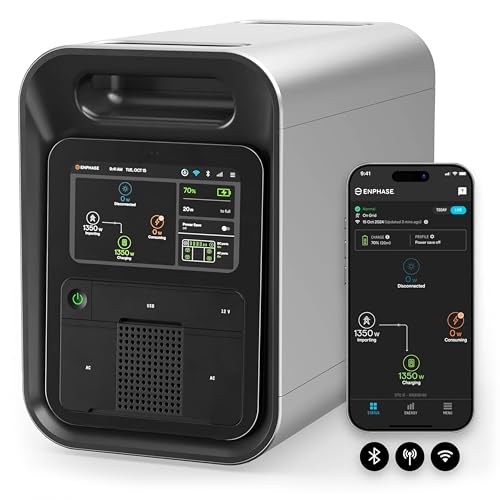

If you need a laptop-ready power station that also handles heavier loads without blinking, the Enphase IQ PowerPack 1500 stands out. We get 1500 W continuous output and a 1500 Wh LiFePO4 battery, plus four 120 V AC outlets, dual 60 W USB‑C, four USB‑A, and a 12 V car port. It recharges fast from AC in under 75 minutes, or about four hours via two IQ Portable Solar Panels. The 7-inch touchscreen and Enphase App give real-time control over 4G, Wi‑Fi, or Bluetooth. It swaps to backup in under 10 ms, runs indoors or outdoors, and carries a 5‑year/2,500‑cycle warranty.
Best For: Campers, homeowners, and mobile workers who need a rugged, fast‑charging, app‑connected power station that can run laptops and heavier appliances with reliable backup performance.
Pros:
- 1500 W continuous output with 3000 W surge and 1500 Wh LiFePO4 battery for robust, safe power
- Rapid AC recharge in under 75 minutes; solar recharge ~4 hours with two IQ Portable Solar Panels
- 7″ touchscreen with 4G/Wi‑Fi/Bluetooth and Enphase App for real-time monitoring and control; UL certified, -4°F to 122°F operation
Cons:
- Heavier at ~45.9 lb, less convenient for frequent hand-carry transport
- 1500 W continuous limit may be insufficient for high-draw appliances like large space heaters or some power tools
- Vehicle DC recharge is slow (~14 hours) compared to AC or solar options
Jackery Portable Power Station Explorer 300 (293Wh)

Looking for a lightweight, laptop-friendly power pick that won’t overwhelm your pack? We like Jackery’s Explorer 300 for travel and everyday backup. At 7.1 pounds with a 293Wh battery, it delivers clean, quiet power through two pure sine wave AC outlets (300W, 500W surge). Ports include PD 60W USB-C in/out, Quick Charge 3.0, USB-A, and a 12V car port.
Recharge fast: hit 80% in about 2 hours using the wall plus 60W USB-C. It supports pass-through charging and up to six devices—great for laptops, routers, cameras, and drones. Add a SolarSaga 100 for green recharging via MPPT. Note: skip high-draw appliances. Accessories included.
Best For: Travelers, campers, and home backup users who need a lightweight, laptop-friendly power station with fast recharge and clean, quiet output for small electronics.
Pros:
- Compact 7.1 lb design with 293Wh capacity; two pure sine wave AC outlets (300W, 500W surge) and versatile ports including 60W USB-C in/out
- Fast recharge to 80% in ~2 hours via wall plus 60W USB-C; supports pass-through charging and up to six devices at once
- Optional SolarSaga 100 compatibility with MPPT for efficient off-grid solar charging; quiet, no fumes, low maintenance
Cons:
- Not suitable for high-draw appliances (e.g., induction cooktops, blenders, space heaters)
- Solar panel not included; extra cost for full solar setup
- Limited AC output (300W) and modest capacity may require power management on longer trips
EnginStar Portable Power Station 300W (296Wh)

Compact yet capable, the EnginStar Portable Power Station 300W (296Wh) stands out for travelers and remote workers who need true 110V pure sine wave AC power for laptops and small desktops without noisy generators. We get two AC outlets rated at 300W, eight total outputs, plus USB-C (18W) and fast USB ports. The multiport layout lets us run a laptop while charging phones, cameras, or a drone. With 296Wh and regulated 12V/24V DC, it can support CPAP or mini-fridges. It recharges via wall, 12V car, or 12–25V solar, hitting full in about seven hours. Safety features include BMS protections and ETL certification.
Best For: Travelers, campers, and remote workers who need quiet, true 110V pure sine wave AC power for laptops, CPAP, and small appliances with multi-device charging.
Pros:
- Pure sine wave dual AC outlets (300W) plus 8 total ports, including USB-C 18W and fast USB, for simultaneous charging.
- Versatile recharging options: wall, 12V car, or 12–25V solar with built-in controller; ~7-hour full charge.
- Regulated 12V/24V DC outputs for CPAP/mini-fridge, with robust BMS protections and ETL certification.
Cons:
- 300W AC output limits use to smaller appliances; not suitable for high-wattage devices.
- USB-C maxes at 18W (no PD 60–100W), so fast-charging larger laptops isn’t supported via USB-C.
- Maximum charging speed (~65W) means slower recharge compared to newer higher-input competitors.
Factors to Consider When Choosing Portable Power Stations for Computers
As we compare options, we’ll match your computer’s power output needs to the right battery capacity and ensure the ports and plug types fit your setup. We’ll confirm the inverter provides a pure sine wave for safe, stable performance. Finally, we’ll weigh recharge speed options so you’re back to work fast whether charging from the wall, car, or solar.
Power Output Needs
How much power does your setup really pull under load? We should match the power station’s continuous output to our computer’s actual draw, not its idle figure. For most PCs, that means at least 60–2,000 W continuous. Gaming rigs and GPU workstations often land around 500–1,000 W; they benefit from 1,000–2,000 W ceilings for stability.
Always check two numbers: the continuous (rated) wattage and the surge capacity. The surge rating must exceed your PC’s peak startup draw to prevent tripping or shutdowns. Add headroom for monitors, docks, audio gear, and chargers so the station’s total output remains comfortably above the combined continuous load.
If we stress-test under full load, we’ll know the real requirement—and choose a unit that sustains it without throttling.
Battery Capacity Sizing
When sizing battery capacity, we start with watt-hours because they tell us how long a station can keep our computer running. To estimate what we need, we multiply our computer’s power draw (in watts) by the hours of runtime we want. That gives us a target Wh. For example, a 100 W laptop for 4 hours needs about 400 Wh.
We also plan for inefficiencies and growth. Long outages or power-hungry desktops benefit from a margin above the calculated number. Portable stations commonly span 300–1500 Wh: smaller units suit short sessions or ultrabooks; larger packs sustain editing rigs or gaming PCs for longer but add weight and cost.
Don’t forget peak draw. Ensure the system can handle startup surges so it doesn’t trip under sudden load.
Port and Plug Types
With capacity in mind, we now need the right connections to actually power our setup. For computers, multiple 110–120V AC outlets are key; some stations offer two or more plugs with higher wattage limits to handle desktops or docking stations. We should match the unit’s continuous and surge wattage to our load: many laptop-plus-peripheral kits pull 300–600W continuously, with higher spikes on startup.
USB-C PD ports add flexibility by powering or charging laptops directly, freeing AC outlets for monitors or speakers. A mix of USB-A and a 12V car port helps run routers, hubs, or networking gear. Port layout matters too—spaced AC sockets prevent bulky adapters from blocking neighbors. Choose a station that lets us power everything simultaneously without daisy-chaining.
Pure Sine Wave
Why insist on pure sine wave output for a computer-ready power station? Because our desktops, laptops, and adapters expect smooth, clean AC power. Pure sine wave inverters avoid the harmonic distortion common with modified sine wave units, preventing glitches, coil whine, and random shutdowns.
We also get stable voltage and frequency—typically 120V/60Hz or 230V/50Hz—under changing loads, which keeps systems steady during heavy tasks. Pure sine wave models handle inrush and surge better, so PSU startup doesn’t trip protection or stress components.
Most modern PCs use active PFC supplies and run more efficiently and quietly on pure sine power. When sizing, confirm the continuous watt rating exceeds your total draw—computer plus monitors and peripherals. Leave headroom, since inverter efficiency varies with load.
Recharge Speed Options
How quickly can we get back to 100% after a work session or outage? Recharge speed matters because it dictates our downtime. Fast AC recharge is the quickest route—many top units refuel from the grid in under 75 minutes, depending on input capacity. If the power station accepts higher wattage, it fills faster.
Solar is slower and variable. Output hinges on panel wattage, sunlight, and whether the station’s MPPT controller efficiently tracks the maximum power point. Expect several hours even with appropriate panels. Vehicle DC charging is typically the slowest, best used when AC or solar isn’t available.
We also like pass-through charging. It lets us run a computer while the battery recharges, keeping workflows moving while the station steadily rebuilds capacity.
Portability and Weight
Where will we actually carry the power station, and for how long? Portability starts with weight and size. Sub‑8‑pound units slip into a backpack for coffee-shop stints or short commutes; 40–45‑pound stations deliver far more watt-hours but aren’t fun on stairs or long walks. We should balance capacity (Wh) and output (W) against how often we’ll move it and how long we need to power a laptop.
Handle design matters. Shoulder-friendly grips, rounded edges, and slim profiles reduce fatigue and snags in tight spaces. Built-in cable stowage or an included case cuts clutter and speeds pack‑up. Don’t forget real-world carry: weight distribution alongside a laptop bag, plus recharge options on the move, determine whether the setup stays practical between home, office, and field.
Safety and Protection Features
Ultimately, a portable power station must keep our computers safe as it supplies power. We should prioritize models with an advanced battery management system that actively monitors voltage, temperature, and charge cycles to prevent overcharging and overheating. Overcurrent, short-circuit, and overload protection are essential to shield our devices from spikes and surges.
We also need clean power. A Pure Sine Wave inverter delivers stable AC output that sensitive components—CPUs, GPUs, SSDs—expect, reducing risk of glitches or damage. Safety certifications like ETL or UL add third-party assurance, while robust enclosures and port covers help block dust and moisture during travel or outdoor use.
Finally, let’s favor proven battery chemistries. LiFePO4—or well-managed Li‑ion—with documented cycle life ensures safer operation and reliable performance over years.
Conclusion
We’ve just toured three pint‑sized power titans, and the takeaway couldn’t be louder. Enphase IQ PowerPack 1500 is a desktop’s lifeline, Jackery Explorer 300 is a backpack’s secret weapon, and EnginStar 300W is a multitasking marvel. With these, our laptops hum like perpetual-motion machines, deadlines melt, and coffee shops become optional. Choose capacity, ports, and recharge speed wisely, and we’ll conquer road trips, campgrounds, and client calls with electricity to spare—and swagger for days.